
Kannel compatible HTTP API
Ozeki SMS Gateway provides full support for Kannel-compatible HTTP SMS API calls, making it easy to migrate existing Kannel integrations without major application changes. Send SMS messages, configure delivery reports, manage routing, and handle advanced messaging parameters through familiar HTTP requests. The API supports GET, POST, HTTP headers, and XML-based message submission for flexible integration with business applications. With Ozeki, developers can connect existing Kannel-based SMS applications to a powerful and reliable SMS gateway platform.
Ozeki SMS Gateway Fully Supports the Kannel HTTP SMS API
Ozeki SMS Gateway provides full support for the Kannel HTTP SMS Gateway API, making it possible to connect applications that were designed to communicate with Kannel directly to an Ozeki SMS Gateway installation. The Kannel SMS API is an HTTP based interface that allows software applications to submit SMS messages to an SMS gateway. The API supports traditional HTTP GET requests, HTTP POST requests, Kannel headers, XML message submission, delivery reports, SMSC routing, Unicode and binary messaging, message scheduling and other advanced SMS parameters.
With Ozeki, you can continue using your existing Kannel-compatible application logic while using Ozeki as the SMS gateway behind your application. This makes Ozeki a practical choice when you want to migrate from Kannel without having to redesign your entire SMS application.
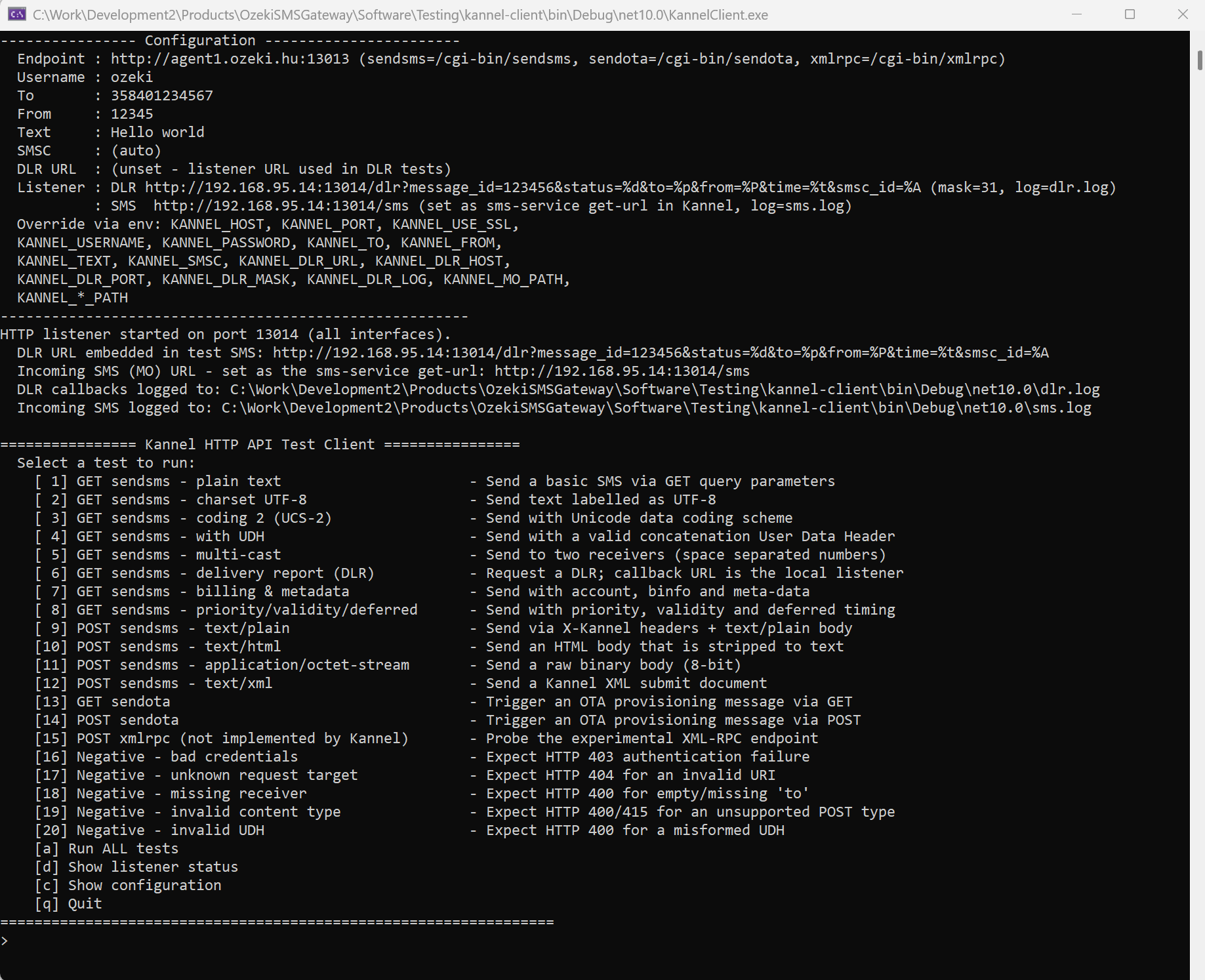
Kannel API compatibility tester client
To test Kannel API compatibility in Ozeki, you can download this free open source HTTP API tester client app. This was developed to verify the Kannel API functionality.
Download: kannel-client.zip (297Kb)
Why Use Ozeki with the Kannel API?
If your application already uses the Kannel HTTP SMS API, changing SMS gateways does not have to mean changing your application architecture.
- Use Kannel-compatible HTTP SMS requests.
- Send SMS messages using HTTP GET requests.
- Send SMS messages using HTTP POST requests.
- Use Kannel-style HTTP headers.
- Submit messages using the Kannel XML format.
- Specify sender and recipient numbers.
- Use SMSC routing parameters.
- Request delivery reports.
- Work with 7-bit, 8-bit and UCS-2 message coding.
- Support Unicode SMS messages.
- Support binary SMS payloads and UDH data.
- Use message priority, validity and deferred delivery parameters.
- Send messages to multiple recipients.
- Handle standard HTTP response codes.
The Kannel client-side specification defines the smsbox HTTP interface as the standard mechanism for sending push SMS messages, requesting delivery reports and sending OTA configuration messages.
Kannel API Endpoints Supported by Ozeki
The Kannel HTTP interface commonly exposes the following request targets:
| Endpoint | Purpose |
|---|---|
| /cgi-bin/sendsms | Send one or more SMS messages |
| /cgi-bin/sendota | Send OTA provisioning messages |
| /cgi-bin/xmlrpc | XML-RPC interface defined by Kannel |
The primary Kannel SMS interface is /cgi-bin/sendsms. It can be used with both GET and POST requests. API paths can be configured on the gateway. The conventional Kannel SMS HTTP port is 13013, with HTTPS available when TLS is enabled.
Kannel GET /cgi-bin/sendsms API
The traditional Kannel SMS API uses an HTTP GET request with parameters supplied in the URL query string.
Example
GET /cgi-bin/sendsms?username=USER&password=PASS&to=358401234567&text=Hello%20world&from=1234 HTTP/1.1
Host: gateway.example.com:13013
Applications can use this simple HTTP interface to submit SMS messages to Ozeki.
GET Parameters
| Parameter | Required | Description |
|---|---|---|
| username | Yes | API username. The user alias is also supported. |
| password | Yes | API password. The pass alias is also supported. |
| to | Yes | Destination phone number or multiple destinations. |
| from | No | Sender number or sender name. |
| text | No | SMS message body. |
| charset | No | Character encoding used by the message. |
| coding | No | SMS coding. Supports 7-bit, 8-bit and UCS-2 modes. |
| udh | No | User Data Header in hexadecimal format. |
| smsc | No | Logical SMSC used for routing. |
| dlr-url | No | URL that receives delivery reports. |
| dlr-mask | No | Delivery report event mask. |
| account | No | Billing or account identifier. |
| binfo | No | Billing information. |
| mclass | No | SMS message class. |
| pid | No | Protocol identifier. |
| rpi | No | Reply path indicator. |
| alt-dcs | No | Alternative data coding scheme flag. |
| mwi | No | Message waiting indicator. |
| compress | No | Compression flag. |
| validity | No | Message validity period in minutes. |
| deferred | No | Delay before sending, in minutes. |
| priority | No | Message priority from 0 to 3. |
| meta-data | No | Application-defined metadata associated with the message. |
Kannel SMS API Example with Ozeki
A simple Kannel-compatible application can submit an SMS using a URL such as:
http://gateway.example.com:13013/cgi-bin/sendsms?username=tester&password=foobar&to=358401234567&text=Hello%20from%20Ozeki&from=12345The application does not need to implement a proprietary Ozeki API when it is designed around the Kannel HTTP interface. The Kannel-compatible request structure can be used to communicate with the SMS gateway.
Kannel POST /cgi-bin/sendsms API
Kannel also supports HTTP POST requests for sending SMS messages. With POST, the message body can contain the SMS text, binary data or an XML submit document, depending on the Content-Type.
Supported Content Types
| Content-Type | Purpose | Default Coding |
|---|---|---|
| text/plain | Plain text SMS | 7-bit |
| text/html | HTML converted to SMS text | 7-bit |
| text/vnd.wap.wml | WML content converted to SMS text | 7-bit |
| application/octet-stream | Binary SMS payload | 8-bit |
| text/xml | Kannel XML submit document | Defined by XML |
Kannel HTTP Headers
For standard POST message types, Kannel uses X-Kannel headers to carry message attributes.
| Kannel Header | API Parameter |
|---|---|
| X-Kannel-Username | username |
| X-Kannel-Password | password |
| X-Kannel-From | from |
| X-Kannel-To | to |
| X-Kannel-UDH | udh |
| X-Kannel-SMSC | smsc |
| X-Kannel-Coding | coding |
| X-Kannel-MClass | mclass |
| X-Kannel-PID | pid |
| X-Kannel-RPI | rpi |
| X-Kannel-Alt-DCS | alt-dcs |
| X-Kannel-MWI | mwi |
| X-Kannel-Compress | compress |
| X-Kannel-Validity | validity |
| X-Kannel-Deferred | deferred |
| X-Kannel-Priority | priority |
| X-Kannel-DLR-Mask | dlr-mask |
| X-Kannel-DLR-URL | dlr-url |
| X-Kannel-Account | account |
| X-Kannel-BInfo | binfo |
| X-Kannel-Meta-Data | meta-data |
POST Example
curl -sS -X POST \
-H "X-Kannel-Username: tester" \
-H "X-Kannel-Password: foobar" \
-H "X-Kannel-To: 358401234567" \
-H "X-Kannel-From: 12345" \
-H "X-Kannel-DLR-URL: https://example.com/dlr" \
-H "X-Kannel-DLR-Mask: 3" \
-H "Content-Type: text/plain" \
--data "Hello from Ozeki" \
"http://gateway.example.com:13013/cgi-bin/sendsms"
This approach is useful for applications that want to keep the SMS content in the HTTP request body while providing SMS parameters through Kannel-compatible headers.
Kannel XML SMS API
The Kannel SMS API supports XML message submission through a POST request with Content-Type set to text/xml. The XML document uses a message and submit structure. Authentication, sender, recipient, coding, delivery report settings and message content can be included in the document.
Example Kannel XML SMS Request
<?xml version="1.0" encoding="UTF-8"?>
<message>
  <submit>
    <from>
      <username>tester</username>
      <password>foobar</password>
      <account>acct-1</account>
    </from>
    <oa>
      <number>12345</number>
    </oa>
    <da>
      <number>358401234567</number>
    </da>
    <dcs>
      <coding>0</coding>
    </dcs>
    <statusrequest>
      <dlr-url>https://example.com/dlr</dlr-url>
      <dlr-mask>3</dlr-mask>
    </statusrequest>
    <ud>Hello from XML</ud>
  </submit>
</message>
Multiple destination numbers can be included using multiple da elements, allowing the same SMS content and message attributes to be submitted to multiple recipients.
SMS Encoding and Unicode Support
The Kannel API supports different SMS coding modes for different message types.
| Coding | Meaning |
|---|---|
| 0 | 7-bit SMS text |
| 1 | 8-bit SMS data |
| 2 | UCS-2 SMS text |
This makes the API suitable for applications that need standard text messages, international Unicode messages, binary SMS data or messages requiring User Data Headers. Ozeki SMS Gateway supports the message encoding capabilities required for Kannel-compatible SMS applications.
Sender and SMSC Routing
Kannel applications can specify the sender and SMSC routing information as part of the SMS request. The sender can be resolved from several sources, including a configured sender, the sender supplied by the application and a global sender configuration. SMSC routing can similarly use a forced SMSC, a client-supplied SMSC or a configured default SMSC. This allows applications to control which SMS connection is used for sending messages when multiple SMS routes are available.
Kannel Delivery Reports and DLR Support
Delivery reports are an important part of many SMS applications. The Kannel API supports delivery reporting through the dlr-url and dlr-mask parameters. The application provides a callback URL and selects which delivery events it wants to receive.
| DLR | Value | Meaning |
|---|---|---|
| DLR_SUCCESS | 1 | Final successful delivery |
| DLR_FAIL | 2 | Final delivery failure |
| DLR_BUFFERED | 4 | Message buffered for later delivery |
| DLR_SMSC_SUCCESS | 8 | SMSC accepted the message |
| DLR_SMSC_FAIL | 16 | SMSC rejected the message |
| DLR_EXPIRED | 34 | Message expired |
| DLR_UNKNOWN | 66 | Unknown delivery status |
For applications that depend on delivery status, Kannel-compatible DLR functionality makes it possible to receive asynchronous delivery information through an HTTP callback. Ozeki supports delivery reporting so SMS applications can track the status of submitted messages.
Complete Kannel API Parameter Reference
| Concept | GET | POST Header | XML |
|---|---|---|---|
| username | username / user | X-Kannel-Username | from/username or from/user |
| password | password / pass | X-Kannel-Password | from/password or from/pass |
| from | from | X-Kannel-From | oa/number |
| to | to | X-Kannel-To | da/number |
| text | text | Request body | ud |
| charset | charset | Content-Type charset | XML declaration |
| coding | coding | X-Kannel-Coding | dcs/coding |
| udh | udh | X-Kannel-UDH | udh |
| smsc | smsc | X-Kannel-SMSC | smsc |
| dlr-url | dlr-url | X-Kannel-DLR-URL | statusrequest/dlr-url |
| dlr-mask | dlr-mask | X-Kannel-DLR-Mask | statusrequest/dlr-mask |
| account | account | X-Kannel-Account | from/account |
| binfo | binfo | X-Kannel-BInfo | from/binfo |
| mclass | mclass | X-Kannel-MClass | dcs/mclass |
| pid | pid | X-Kannel-PID | pid |
| rpi | rpi | X-Kannel-RPI | rpi |
| alt-dcs | alt-dcs | X-Kannel-Alt-DCS | dcs/alt-dcs |
| mwi | mwi | X-Kannel-MWI | dcs/mwi |
| compress | compress | X-Kannel-Compress | dcs/compress |
| validity | validity | X-Kannel-Validity | vp/delay |
| deferred | deferred | X-Kannel-Deferred | timing/delay |
| priority | priority | X-Kannel-Priority | priority |
| meta-data | meta-data | X-Kannel-Meta-Data | meta-data |
Kannel HTTP Response Codes
Kannel applications commonly inspect the HTTP status code and response body to determine the result of an SMS submission.
| HTTP Status | Meaning | Typical Response |
|---|---|---|
| 202 | Accepted | Sent. |
| 400 | Bad Request | Invalid or missing parameter |
| 403 | Forbidden | Authentication or routing failure |
| 404 | Not Found | Unknown request target |
| 415 | Unsupported Media Type | Unsupported Content-Type |
| 500 | Internal Server Error | Sending failed |
| 503 | Service Unavailable | Temporary failure |
Successful Responses
A Kannel-compatible implementation may return responses such as:
Sent.or:
0: Accepted for deliveryor:
3: Queued for later deliveryApplications should distinguish between accepted messages and messages that have actually reached the recipient. A successful HTTP submission generally indicates that the SMS has been accepted for processing, while delivery reports provide later delivery information.
SMS Splitting and Multi-Recipient Messaging
The Kannel API supports sending the same message to multiple recipients. With GET requests, destination numbers can be supplied as space-separated values. With XML POST requests, multiple da number elements can be used. Long SMS messages can also be split into multiple SMS parts. When concatenation is enabled, User Data Headers can be used to identify the individual parts as belonging to the same long message. This functionality is important for applications that send long text messages or need to deliver the same SMS to many recipients.
Kannel API Authentication
Kannel authenticates SMS API requests with a username and password. For GET requests, the credentials are supplied using username and password parameters. The user and pass aliases are also supported. For standard POST requests, authentication can be supplied through X-Kannel-Username and X-Kannel-Password headers. For XML POST requests, the credentials are included inside the XML submit document. IP-based access restrictions can also be used as an additional access control mechanism.
Kannel API Validation and Error Handling
A Kannel-compatible SMS application should validate the HTTP response before deciding whether a message should be retried.
- 202 Accepted: The SMS request has been accepted for delivery.
- 400 Bad Request: The request contains invalid or missing data and normally should not be retried without correcting the request.
- 403 Forbidden: Authentication failed or the message is not routable.
- 404 Not Found: The requested API endpoint is not available.
- 415 Unsupported Media Type: The supplied Content-Type is not supported.
- 500 Internal Server Error: The message could not be handed to the SMS processing system.
- 503 Service Unavailable: A temporary failure occurred and the application may retry later.
Following these response semantics helps applications avoid unnecessary duplicate SMS submissions.
Migrate from Kannel to Ozeki SMS Gateway
If you have an existing application built around the Kannel HTTP SMS API, Ozeki provides a straightforward path to a modern SMS gateway environment while retaining the familiar HTTP integration model. Your application can continue to use Kannel-style API requests for SMS submission, including GET requests, POST requests, Kannel headers, XML messages, sender information, SMSC routing and delivery report settings.
Typical Migration Process
- Install and configure Ozeki SMS Gateway.
- Connect Ozeki to your preferred SMS service provider, SMPP connection, GSM modem or other SMS route.
- Configure the SMS API interface.
- Point your existing Kannel-compatible application to the Ozeki gateway.
- Test SMS submission using the existing API requests.
- Test delivery reports and error handling.
- Move your production traffic to Ozeki.
This approach allows organizations to modernize their SMS infrastructure while minimizing changes to existing software.
Example Kannel SMS Integration
The following example demonstrates the basic request pattern used by applications communicating with a Kannel-compatible SMS gateway:
curl -sS "http://gateway:13013/cgi-bin/sendsms?username=tester&password=foobar&to=358401234567&text=Hello%20Kannel&from=12345"When the API endpoint is provided by Ozeki, the same application integration model can be used to submit the SMS request.
Who Can Benefit from Kannel API Compatibility?
Ozeki Kannel API support is particularly useful for organizations that already have software based on the Kannel HTTP SMS interface.
- Enterprise SMS applications
- Legacy SMS software
- Custom SMS notification systems
- Bulk SMS applications
- SMS marketing platforms
- Two-factor authentication systems
- Transaction notification systems
- Monitoring and alerting applications
- Telecommunications applications
- Developers migrating away from Kannel
Kannel API Compatibility Without Rebuilding Your SMS Application
Changing the underlying SMS gateway should not require rebuilding an established application from scratch. By supporting the Kannel HTTP SMS API, Ozeki allows existing HTTP-based SMS integrations to continue using familiar request structures and SMS parameters. From simple GET-based SMS submission to POST requests, XML messaging, delivery reports, Unicode SMS, binary data, routing and advanced message parameters, the Kannel API provides a flexible integration model for software developers. Ozeki SMS Gateway brings this familiar API approach together with a modern SMS gateway platform, giving organizations a practical option for Kannel-compatible SMS integrations.
Frequently Asked Questions
Does Ozeki SMS Gateway support the Kannel SMS API?
Yes. Ozeki SMS Gateway supports Kannel-compatible HTTP SMS API calls, allowing applications designed around the Kannel HTTP interface to communicate with the gateway.
Can I use the Kannel /cgi-bin/sendsms endpoint?
Yes. The /cgi-bin/sendsms endpoint is the primary Kannel SMS submission interface and is supported for Kannel-compatible SMS integration.
Does the Kannel API support GET requests?
Yes. Kannel supports GET requests with SMS parameters supplied in the URL query string.
Does the Kannel API support POST requests?
Yes. POST requests can carry SMS content in the request body while Kannel parameters can be supplied using X-Kannel headers or an XML document.
Can I send SMS messages using XML?
Yes. The Kannel SMS API defines a text/xml POST format using a message submit document.
Does the Kannel API support delivery reports?
Yes. Delivery reports can be requested using dlr-url and dlr-mask parameters.
Can Kannel-compatible applications send Unicode SMS?
Yes. The API supports UCS-2 coding for messages that require Unicode characters.
Can I send binary SMS messages?
Yes. The Kannel API supports 8-bit message data and User Data Headers.
Can I send an SMS to multiple recipients?
Yes. Multiple recipients can be specified in Kannel-compatible requests.
Can I migrate an existing Kannel application to Ozeki?
Yes. Kannel-compatible HTTP API support makes Ozeki suitable for applications that want to move their SMS gateway infrastructure while retaining their existing API integration model.
Conclusion
The Kannel HTTP SMS API is a flexible and widely used interface for integrating applications with an SMS gateway. It supports HTTP GET and POST requests, XML submissions, SMS encoding, sender and SMSC routing, delivery reports, multi-recipient messaging, message splitting and advanced SMS parameters. Ozeki SMS Gateway fully supports the Kannel API calls needed for these integration scenarios, providing a practical solution for organizations that want to use Ozeki with existing Kannel-compatible SMS applications. If your software already communicates with Kannel, you can use the Kannel API integration approach with Ozeki and continue sending SMS messages without redesigning your application around a completely different API.