
Kannel Compatible API: Keep Your Existing Code When You Switch to Ozeki
The most expensive part of replacing an SMS gateway is not the gateway itself. It is the application work: every script, service and integration that calls the old API has to be found, changed, tested and redeployed. Ozeki SMS Gateway removes this cost. It implements the Kannel sendsms HTTP API, so your applications keep sending requests with the same URL path, the same parameters and the same response handling they use today. This page documents the interface from a developer perspective: the request format, a full parameter reference, delivery report callbacks, encoding rules, and code samples in PHP, Python, Java and C# that run against both gateways without modification. For the reasons to switch, see our Kannel alternative overview. For the cutover procedure, read the migration guide.
API compatibility
When you switch from Kannel to Ozeki, you throw out Kannel, and switch to the Kannel compatible API built into Ozeki SMS Gateway. After migration your apps will connect to Ozeki. It is very crucial to understand the compatibility, and how Ozeki SMS Gateway provides compatible interfaces to your Kannel apps (Figure 1).
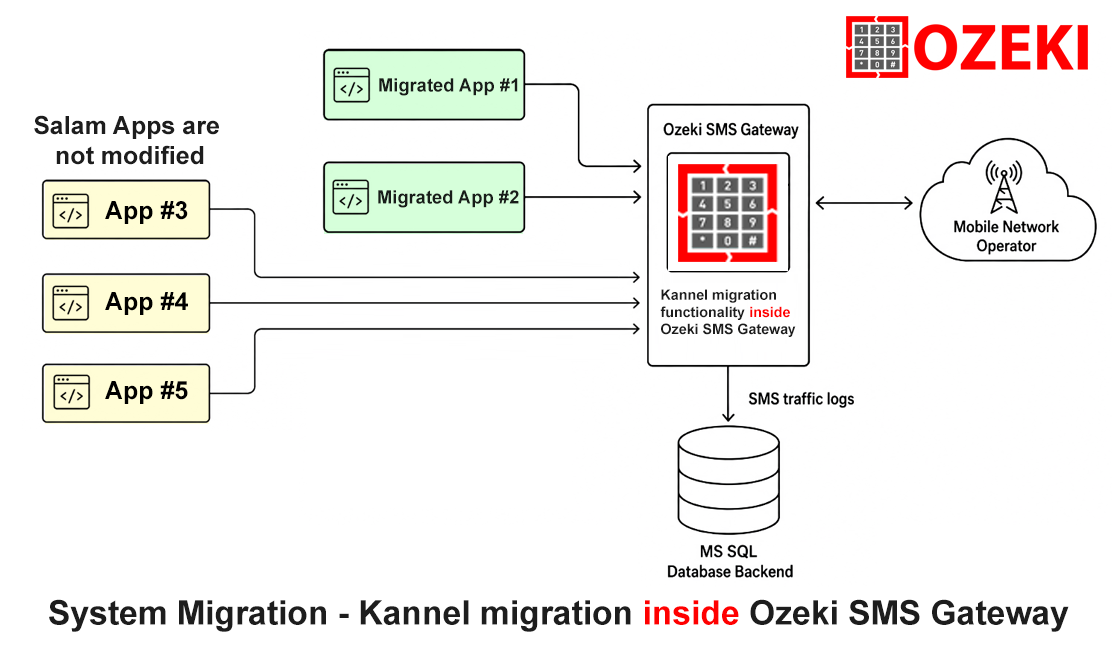
How the Kannel sendsms HTTP API Works
Kannel exposes message submission through the smsbox HTTP interface. Applications send an HTTP GET or POST request to the /cgi-bin/sendsms path on the configured sendsms port, which is 13013 in a default installation. The request carries the credentials of a sendsms user, the recipient, the message text, and optional parameters for routing, encoding and delivery reports. Kannel answers with a plain text body and an HTTP 202 status code. This simple contract, a single URL with query parameters, is the reason thousands of applications integrated with Kannel over the years, and it is exactly the contract Ozeki reproduces.
The Same Request Works on Both Gateways
Suppose your application sends this request to Kannel today:
http://kannel.example.com:13013/cgi-bin/sendsms?username=myuser&password=secret&to=%2B36201234567&from=MyApp&text=Hello+world
To send the same message through Ozeki, change only the host and port:
http://ozeki.example.com:PORT/cgi-bin/sendsms?username=myuser&password=secret&to=%2B36201234567&from=MyApp&text=Hello+world
The path, the parameters and the values are identical. A quick test with curl confirms the response format:
curl "http://ozeki.example.com:PORT/cgi-bin/sendsms?username=myuser&password=secret&to=%2B36201234567&from=MyApp&text=Hello+world"

0: Accepted for delivery
Ozeki returns the same plain text responses your code already parses: 0: Accepted for delivery when the message is accepted, 3: Queued message accepted for delivery when it is queued, and Authorization failed when the credentials do not match a user account.
sendsms Parameter Reference
The table below lists the parameters your applications may use. Ozeki accepts each one with the same meaning, so no request has to be rewritten. Note that the smsc parameter, which forces a message onto a specific SMSC connection in Kannel, selects the corresponding connection or route in Ozeki.
| Parameter | Purpose |
|---|---|
| username, password | Credentials of the sendsms user |
| to | Recipient phone number, URL encoded |
| from | Sender address (sender ID or number) |
| text | Message body, URL encoded |
| smsc | Routes the message to a specific SMSC connection |
| udh | User data header in hexadecimal, for concatenated and binary messages |
| coding | Data coding: 0 (GSM 7 bit), 1 (8 bit binary), 2 (UCS-2) |
| charset | Character set of the text parameter, for example utf-8 |
| dlrmask | Bitmask selecting which delivery events trigger a callback |
| dlrurl | Callback URL that receives the delivery events |
| mclass | Message class: 0 normal, 1 flash, 2 phone memory, 3 SIM card |
| flash | Shorthand for mclass=1 |
| pid | Protocol identifier, used for special message types |
| mwi | Message waiting indicator settings |
| alt-dcs | Alternate data coding scheme handling |
| validity | Validity period in minutes |
| deferred | Deferred delivery time in minutes |
| account | Account identifier passed along for billing |
| binfo | Billing identifier |
Delivery Report Callbacks: dlrmask and dlrurl
Delivery reports are the part of the sendsms contract that applications depend on most. Two parameters control them. dlrmask is a bitmask that selects which events trigger a callback:
| Bit | Event |
|---|---|
| 1 | Delivered to the phone (delivery success) |
| 2 | Not delivered (delivery failure) |
| 4 | Buffered on the SMSC (queued for later delivery) |
| 8 | Accepted by the SMSC (submit success) |
| 16 | Rejected by the SMSC (submit failure) |
Common values are dlrmask=3 for the final delivery result and dlrmask=31 for all events. dlrurl is the callback URL. When an event occurs, the gateway calls this URL and replaces substitution variables with the actual values:
| Variable | Replaced with |
|---|---|
| %d | Numeric delivery status code matching the bits above |
| %s | Sender address |
| %r | Recipient address |
| %t | Time of the event |
| %i | SMSC identifier of the connection that handled the message |
| %q | Message ID assigned by the SMSC |
If your application passes dlrurl=http://app.example.com/dlr?id=123&status=%d, it receives requests like these:
GET /dlr?id=123&status=1   (delivered)
GET /dlr?id=123&status=2   (failed)
One detail catches many developers. Inside the sendsms request, the dlrurl value must be URL encoded, so the %d variable is transmitted as %25d. The request parameter therefore looks like this:
dlrurl=http%3A%2F%2Fapp.example.com%2Fdlr%3Fid%3D123%26status%3D%25d
If you use a URL encoding function in your code, as the samples below do, this happens automatically. Beyond HTTP callbacks, Ozeki also stores every message and its delivery status internally, which is covered on our Kannel DLR alternative page.
Character Encoding, Long Messages and Binary Content
Both gateways handle message content the same way:
- coding=0: GSM 03.38 default alphabet, 7 bit, up to 160 characters per message
- coding=1: 8 bit binary content
- coding=2: UCS-2 encoding for characters outside the GSM alphabet, 70 characters per part
The charset parameter tells the gateway which character set your text value uses, for example utf-8, and the gateway converts it to the GSM 7 bit alphabet when possible. When your text contains characters the GSM alphabet cannot represent, submit it with coding=2 and charset=utf-8, and the gateway converts the text to UCS-2.
Long messages are sent as concatenated parts. Applications that assemble parts manually pass a udh parameter in hexadecimal, for example udh=050003A70301 for the first of three parts with reference A7. The same UDH values work on both gateways, and binary formats such as WAP push messages and port addressed application data are submitted the same way.
Code Samples That Work Unchanged
The following samples send a message and print the gateway response. Each one runs against Kannel or Ozeki without modification. The only value to adjust is the base URL: point it at your Kannel host and port today, and at your Ozeki host and port after the migration. The URL encoding functions take care of the dlrurl escaping described above.
PHP
<?php
$baseUrl = "http://ozeki.example.com:PORT/cgi-bin/sendsms";

$query = http_build_query([
"username" => "myuser",
"password" => "secret",
"to"       => "+36201234567",
"from"     => "MyApp",
"text"     => "Hello from PHP",
"dlrmask"  => "3",
"dlrurl"   => "http://app.example.com/dlr?id=123&status=%d",
]);

$response = file_get_contents($baseUrl . "?" . $query);
echo $response; // 0: Accepted for delivery
?>
Python
import urllib.parse
import urllib.request

params = {
"username": "myuser",
"password": "secret",
"to": "+36201234567",
"from": "MyApp",
"text": "Hello from Python",
"dlrmask": "3",
"dlrurl": "http://app.example.com/dlr?id=123&status=%d",
}

url = "http://ozeki.example.com:PORT/cgi-bin/sendsms?" + urllib.parse.urlencode(params)

with urllib.request.urlopen(url) as response:
print(response.read().decode())  # 0: Accepted for delivery
Java
import java.io.InputStream;
import java.net.HttpURLConnection;
import java.net.URL;
import java.net.URLEncoder;
import java.nio.charset.StandardCharsets;

public class SendSms {
public static void main(String[] args) throws Exception {
    String dlr = URLEncoder.encode("http://app.example.com/dlr?id=123&status=%d",
                                   StandardCharsets.UTF_8);
    String url = "http://ozeki.example.com:PORT/cgi-bin/sendsms"
               + "?username=myuser&password=secret"
               + "&to=" + URLEncoder.encode("+36201234567", StandardCharsets.UTF_8)
               + "&from=MyApp"
               + "&text=" + URLEncoder.encode("Hello from Java", StandardCharsets.UTF_8)
               + "&dlrmask=3&dlrurl=" + dlr;

    HttpURLConnection c = (HttpURLConnection) new URL(url).openConnection();
    try (InputStream in = c.getInputStream()) {
        System.out.println(new String(in.readAllBytes(), StandardCharsets.UTF_8));
    }
}
}
C#
using System;
using System.Net;
using System.Net.Http;

class SendSms
{
static void Main()
{
    var dlr = Uri.EscapeDataString("http://app.example.com/dlr?id=123&status=%d");
    var url = "http://ozeki.example.com:PORT/cgi-bin/sendsms"
            + "?username=myuser&password=secret"
            + "&to=" + Uri.EscapeDataString("+36201234567")
            + "&from=MyApp"
            + "&text=" + Uri.EscapeDataString("Hello from C#")
            + "&dlrmask=3&dlrurl=" + dlr;

    using var client = new HttpClient();
    Console.WriteLine(client.GetStringAsync(url).Result);
    // 0: Accepted for delivery
}
}
Differences and Optional Ozeki Extensions
The compatibility is deliberate and complete on the application facing side, but a few points are worth knowing before you switch:
- Base URL. The host and port change, the path and parameters stay the same.
- Responses. The plain text bodies, including the queued and authorization failure messages, match the format your code already handles.
- Routing. The smsc parameter maps to connection and route selection in Ozeki, as described in the migration guide.
- Extensions. Ozeki additionally offers its native HTTP API, SQL database messaging, an SMPP server, and a searchable message archive with delivery status. These are optional. Nothing forces you to adopt them during the migration, and your applications can keep using the Kannel format indefinitely.
During evaluation, test the edge cases your production traffic includes: concatenated messages, UTF-8 text, binary content, and delivery report callbacks. All of them can be verified with the free trial before you plan the cutover.