
Jasmin compatible HTTP API
Ozeki SMS Gateway provides full support for Jasmin-compatible HTTP SMS API calls, making it easy to migrate existing Jasmin integrations without major application changes. Send SMS messages, request delivery reports, receive SMS-MO messages, check account balance and message rates, and monitor gateway metrics through familiar HTTP requests. The API supports GET and POST message submission for flexible integration with business applications. With Ozeki, developers can connect existing Jasmin-based SMS applications to a powerful and reliable SMS gateway platform.
Ozeki SMS Gateway Fully Supports the Jasmin HTTP SMS API
Ozeki SMS Gateway provides full support for the Jasmin HTTP SMS API, making it possible to connect applications that were designed to communicate with Jasmin directly to an Ozeki SMS Gateway installation. The Jasmin SMS API is an HTTP based interface that allows software applications to submit SMS messages to an SMS gateway. The API supports traditional HTTP GET requests, HTTP POST requests, delivery reports (DLR), SMS-MO forwarding, long message concatenation, Unicode and binary messaging, scheduled delivery, account balance checking, rate checking and Prometheus monitoring metrics.
With Ozeki, you can continue using your existing Jasmin-compatible application logic while using Ozeki as the SMS gateway behind your application. This makes Ozeki a practical choice when you want to migrate from Jasmin without having to redesign your entire SMS application.
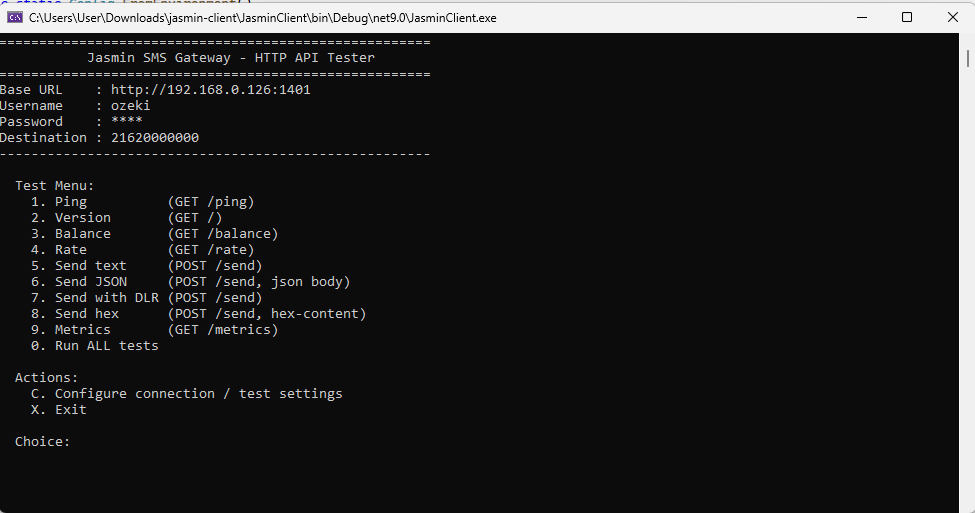
Jasmin API compatibility tester client
To test Jasmin API compatibility in Ozeki, you can download this free open source HTTP API tester client app. This was developed to verify the Jasmin API functionality.
Download: jasmin-client.zip (297Kb)
Why Use Ozeki with the Jasmin API?
If your application already uses the Jasmin HTTP SMS API, changing SMS gateways does not have to mean changing your application architecture.
- Use Jasmin-compatible HTTP SMS requests.
- Send SMS messages using HTTP GET requests.
- Send SMS messages using HTTP POST requests.
- Submit messages with text or binary hex content.
- Specify sender and recipient numbers.
- Request delivery reports with configurable DLR levels.
- Receive SMS-MO messages through HTTP callbacks.
- Work with SMPP data coding schemes, including UCS-2.
- Support Unicode SMS messages.
- Support binary SMS payloads.
- Send long SMS messages split into multiple parts.
- Use message priority, validity period and scheduled delivery parameters.
- Check account balance and message rate price.
- Monitor gateway metrics in Prometheus format.
- Handle standard HTTP response codes.
The Jasmin client-side specification defines the HTTP API interface as the standard mechanism for sending push SMS messages (SMS-MT), requesting delivery reports and receiving SMS-MO messages.
Jasmin API Endpoints Supported by Ozeki
The Jasmin HTTP interface commonly exposes the following request targets:
| Endpoint | Purpose |
|---|---|
| /send | Send one SMS-MT message |
| /balance | Check user account balance and quotas |
| /rate | Check message rate price before sending |
| /metrics | Prometheus monitoring metrics |
The primary Jasmin SMS interface is /send. It can be used with both GET and POST requests. The default Jasmin HTTP API address is http://127.0.0.1:1401/send. The bind address and port are configurable in the jasmin.cfg file under the [http-api] section, with default values of 0.0.0.0 and port 1401. Ozeki supports the same endpoint structure for Jasmin-compatible SMS integrations.
Jasmin GET /send API
The traditional Jasmin SMS API uses an HTTP GET request with parameters supplied in the URL query string. All parameters are passed in the query string and the gateway returns a message id on success.
Example
GET /send?username=jasmin_user&password=jasmin_pass&to=358401234567&content=Hello%20world&from=1234 HTTP/1.1
Host: gateway.example.com:1401
Applications can use this simple HTTP interface to submit SMS messages to Ozeki.
GET Parameters
| Parameter | Required | Description |
|---|---|---|
| to | Yes | Destination address. Only one address is supported per request. |
| username | Yes | Username for the Jasmin user account (30 char. max). |
| password | Yes | Password for the Jasmin user account (30 char. max). |
| content | Conditional | SMS message content. Mandatory if hex-content is not defined. |
| hex-content | Conditional | Binary content in hexadecimal form. Mandatory if content is not defined. |
| from | No | Originating address. |
| coding | No | Data Coding Scheme. Default is 0, accepts all allowed SMPP values. |
| priority | No | Message priority from 0 to 3. Default is 0 (lowest priority). |
| sdt | No | Scheduled delivery time at which message delivery should first be attempted. Supports SMPP absolute and relative times. |
| validity-period | No | Message validity period in minutes to be passed to the SMSC. |
| dlr | No | Delivery report request: yes or no. Default is no. |
| dlr-url | Conditional | URL that receives the delivery report. Mandatory if dlr is set to yes. |
| dlr-level | Conditional | DLR level: 1 SMSC level, 2 terminal level, 3 both. Mandatory if dlr is set to yes. |
| dlr-method | Conditional | HTTP method used to deliver the DLR: GET or POST. Mandatory if dlr is set to yes. |
| tags | No | Tags applied to the routable to help the interceptor or router enable specific business logic. |
Jasmin SMS API Example with Ozeki
A simple Jasmin-compatible application can submit an SMS using a URL such as:
http://gateway.example.com:1401/send?username=jasmin_user&password=jasmin_pass&to=358401234567&content=Hello%20from%20Ozeki&from=12345The application does not need to implement a proprietary Ozeki API when it is designed around the Jasmin HTTP interface. The Jasmin-compatible request structure can be used to communicate with the SMS gateway.
Sending Different Message Types
The Jasmin API supports several message submission scenarios using the same endpoint:
# Send a long SMS (more than 160 characters)
http://gateway.example.com:1401/send?username=jasmin_user&password=jasmin_pass&to=358401234567&content=Very%20long%20message%20....

# Send a Unicode UCS-2 message
http://gateway.example.com:1401/send?username=jasmin_user&password=jasmin_pass&to=358401234567&content=%06%23%06%31%06%46%06%28&coding=8

# Send binary content in hexadecimal form
http://gateway.example.com:1401/send?username=jasmin_user&password=jasmin_pass&to=358401234567&hex-content=0623063106460628&coding=8
Jasmin POST /send API
Jasmin also supports HTTP POST requests for sending SMS messages. With POST, the same parameters are supplied in the request body using standard form encoding. This is useful for applications that prefer to keep message content and attributes out of the URL.
POST Example
curl -sS -X POST \
-d "username=jasmin_user" \
-d "password=jasmin_pass" \
-d "to=358401234567" \
-d "from=12345" \
-d "content=Hello from Ozeki" \
"http://gateway.example.com:1401/send"
This approach is useful for applications that want to keep message parameters in the HTTP request body while using the same Jasmin-compatible parameter names.
POST Example with DLR
curl -sS -X POST \
-d "username=jasmin_user" \
-d "password=jasmin_pass" \
-d "to=358401234567" \
-d "from=12345" \
-d "content=Hello from Ozeki" \
-d "dlr=yes" \
-d "dlr-url=https://example.com/dlr" \
-d "dlr-level=2" \
-d "dlr-method=GET" \
"http://gateway.example.com:1401/send"
SMS Encoding and Unicode Support
The Jasmin API supports different data coding schemes for different message types. The coding parameter sets the Data Coding Scheme bits and accepts all allowed SMPP protocol values.
| Coding | Meaning |
|---|---|
| 0 | SMSC Default Alphabet |
| 1 | IA5 (CCITT T.50)/ASCII (ANSI X3.4) |
| 2 | Octet unspecified (8-bit binary) |
| 3 | Latin 1 (ISO-8859-1) |
| 4 | Octet unspecified (8-bit binary) |
| 5 | JIS (X 0208-1990) |
| 6 | Cyrillic (ISO-8859-5) |
| 7 | Latin/Hebrew (ISO-8859-8) |
| 8 | UCS2 (ISO/IEC-10646) |
| 9 | Pictogram Encoding |
| 10 | ISO-2022-JP (Music Codes) |
| 13 | Extended Kanji JIS (X 0212-1990) |
| 14 | KS C 5601 |
This makes the API suitable for applications that need standard text messages, international Unicode messages or binary SMS data. Ozeki SMS Gateway supports the message encoding capabilities required for Jasmin-compatible SMS applications.
Long SMS and Multi-Part Messaging
The Jasmin API supports sending long SMS messages with more than 160 characters. Long content is automatically split into multiple SMS parts before being routed to the SMSC. The maximum number of parts is configurable (long_content_max_parts, default 5), and the splitting method can be selected between two options:
| Split Method | Description |
|---|---|
| udh | Split using a 6-byte long User Data Header |
| sar | Split using sar_total_segments, sar_segment_seqnum and sar_msg_ref_num options |
When the gateway receives multiple parts of a long SMS-MO, it concatenates the content of all the parts and delivers one HTTP call with the concatenated content. This functionality is important for applications that send long text messages to their subscribers.
Jasmin Delivery Reports and DLR Support
Delivery reports are an important part of many SMS applications. The Jasmin API supports delivery reporting through the dlr, dlr-url, dlr-level and dlr-method parameters. The application provides a callback URL and selects the delivery events it wants to receive. When dlr is set to yes, dlr-url, dlr-level and dlr-method MUST be set.
DLR Levels
| DLR Level | Meaning |
|---|---|
| 1 | SMS-C level only |
| 2 | Terminal level |
| 3 | Both SMS-C and terminal level |
HTTP Parameters for a Level 1 DLR
The following parameters are sent to the receiving end point when the DLR level is set to 1 (SMS-C level):
| Parameter | Description |
|---|---|
| id | Internal Jasmin gateway message id (UUID) used for tracking messages. |
| message_status | The delivery status as an ESME_* SMPP command status, e.g. ESME_ROK. |
| level | Static value indicating the dlr-level originally requested. |
| connector | The SMPP connector used to send the message. |
HTTP Parameters for a Level 2 or 3 DLR
The following additional parameters are sent when the DLR level is set to 2 or 3 (terminal level or all levels):
| Parameter | Description |
|---|---|
| id_smsc | Message id returned by the SMS-C. |
| subdate | Time and date at which the short message was submitted (YYMMDDhhmm). |
| donedate | Time and date at which the short message reached its final state (YYMMDDhhmm). |
| sub | Number of short messages originally submitted. |
| dlvrd | Number of short messages delivered. |
| err | Network specific error code or SMSC error code for the attempted delivery. |
| text | The first 20 characters of the short message. |
DLR Callback Example
GET /dlr?id=07033084-5cfd-4812-90a4-e4d24ffb6e3d&id_smsc=2567&message_status=ESME_ROK&level=2&connector=demo_cid
&subdate=1311022338&donedate=1311022339&err=0&text=Hello HTTP/1.1
Acknowledging Delivery Reports
The receiving end point must reply back using a 200 OK status header and a body containing an acknowledgement of receiving the DLR. The acknowledgement body must be exactly:
ACK/JasminIf one or both conditions are not met, the DLRThrower service will consider reshipment of the same message until the maximum number of retries is reached. Reshipment is delayed by the configured retry_delay (default 30 seconds, with a maximum of 3 retries). It is very important to acknowledge each received DLR to prevent receiving the same message many times.
Receiving SMS-MO Messages
SMS-MO incoming messages (Mobile Originated) are forwarded by the gateway to defined URLs using simple HTTP GET or POST. The forwarding is made by the deliverSmHttpThrower service, and the URL of the receiving endpoint is selected through a route checking process. The receiving endpoint is a third party application which acts on the messages received and potentially generates replies.
HTTP Parameters
| Parameter | Presence | Description |
|---|---|---|
| id | Always | Internal Jasmin gateway message id (UUID). |
| from | Always | Originating address. |
| to | Always | Destination address. |
| origin-connector | Always | Jasmin HTTP connector id. |
| priority | Optional | Message priority, default is 1 (lowest). |
| coding | Optional | Data Coding Scheme, default is 0. |
| validity | Optional | Validity period in YYYY-MM-DD hh:mm:ss format, after which the message should be discarded. |
| content | Always | Content of the message. |
| binary | Always | Content of the message in binary hexlified form. |
SMS-MO Callback Example
GET /mo?id=16fd2706-8baf-433b-82eb-8c7fada847da&from=%2B21620203060&to=%2B21620203050&origin-connector=23&
priority=1&coding=0&content=Hello%20world&binary=48656C6C6F HTTP/1.1
Acknowledging SMS-MO Messages
The receiving end point must reply back using a 200 OK status header and a body containing an acknowledgement of receiving the SMS-MO. The acknowledgement body must be exactly:
ACK/JasminIf one or both of these conditions are not met, the deliverSmHttpThrower service will consider reshipment of the same message until the maximum number of retries is reached (default 3 retries with a 30 second retry delay).
Monitoring Metrics, Account Balance and Rate Checking
Monitoring Metrics
Jasmin provides a native Prometheus exporter with extensive metrics obtained directly from the statistics collector. Metrics can be requested through an HTTP GET from the /metrics URL:
GET /metrics HTTP/1.1
Host: gateway.example.com:1401
The response is a self-documented Prometheus format text response, for example:
# TYPE httpapi_request_count counter
# HELP httpapi_request_count Http request count.
httpapi_request_count 0
# TYPE httpapi_success_count counter
# HELP httpapi_success_count Successful http request count.
httpapi_success_count 0
# TYPE httpapi_auth_error_count counter
# HELP httpapi_auth_error_count Authentication error count.
httpapi_auth_error_count 0
# TYPE httpapi_route_error_count counter
# HELP httpapi_route_error_count Routing error count.
httpapi_route_error_count 0
Checking Account Balance
User account balance and quotas can be checked through an HTTP GET or POST request to the /balance URL:
GET /balance?username=jasmin_user&password=jasmin_pass HTTP/1.1
Host: gateway.example.com:1401
A successful response returns the balance and SMS count in JSON format:
{"balance": 100.0, "sms_count": "ND"}Checking Rate Price
It is possible to ask the HTTP API for a message rate price before sending it. The request looks up the route to be considered for the message and provides the rate price if defined. The request is done through HTTP GET or POST to the /rate URL:
GET /rate?username=jasmin_user&password=jasmin_pass&to=358401234567 HTTP/1.1
Host: gateway.example.com:1401
A successful response returns the number of message units and the unit rate in JSON format:
{"submit_sm_count": 2, "unit_rate": 2.8}Where submit_sm_count is the number of message units if the content is longer than 160 characters. The content parameter is optional for requesting the rate price.
Complete Jasmin API Parameter Reference
The following table summarizes all Jasmin HTTP API parameters and the endpoints that use them.
| Parameter | Endpoint | Presence | Description |
|---|---|---|---|
| to | /send, /rate | Mandatory for /send, Optional for /rate | Destination address. Only one address is supported per request. |
| from | /send, /rate | Optional | Originating address. |
| username | /send, /balance, /rate | Mandatory | Username for the Jasmin user account. |
| password | /send, /balance, /rate | Mandatory | Password for the Jasmin user account. |
| content | /send, /rate | Mandatory for /send if hex-content is not defined, Optional for /rate | Message content. |
| hex-content | /send | Mandatory if content is not defined | Binary content in hexadecimal form. |
| coding | /send, /rate | Optional | Data Coding Scheme, default is 0. |
| priority | /send | Optional | Message priority from 0 to 3, default is 0. |
| sdt | /send | Optional | Scheduled delivery time. |
| validity-period | /send | Optional | Message validity period in minutes. |
| dlr | /send | Optional | Delivery report request: yes or no, default is no. |
| dlr-url | /send | Mandatory if dlr is set to yes | URL that receives the delivery report. |
| dlr-level | /send | Mandatory if dlr is set to yes | DLR level: 1 SMS-C, 2 terminal, 3 both. |
| dlr-method | /send | Mandatory if dlr is set to yes | HTTP method used to deliver the DLR: GET or POST. |
| tags | /send | Optional | Tags applied to the routable for interceptor or router business logic. |
Jasmin HTTP Response Codes
Jasmin applications commonly inspect the HTTP status code and response body to determine the result of an SMS submission.
| HTTP Status | HTTP Body | Meaning |
|---|---|---|
| 200 | Success "07033084-5cfd-4812-90a4-e4d24ffb6e3d" | Message is successfully queued, message-id is returned. |
| 400 | Error "Mandatory arguments not found, please refer to the HTTPAPI specifications." | Request parameters validation error. |
| 400 | Error "Argument _ is unknown." | Request parameters validation error. |
| 400 | Error "Argument _ has an invalid value: _." | Request parameters validation error. |
| 400 | Error "Mandatory argument _ is not found." | Request parameters validation error. |
| 400 | Dynamic error messages | Credentials validation error. |
| 403 | Error "Authentication failure for username:_" | Authentication error. |
| 403 | Error "Authorization failed for username:_" | Credentials validation error. |
| 403 | Error "Cannot charge submit_sm, check RouterPB log file for details" | User charging error. |
| 412 | Error "No route found" | Message routing error. |
| 500 | Error "Cannot send submit_sm, check SMPPClientManagerPB log file for details" | Fallback error; checking the log file provides better details. |
Successful Responses
A Jasmin-compatible implementation returns the following response when a message is successfully queued:
Success "07033084-5cfd-4812-90a4-e4d24ffb6e3d"Applications should distinguish between accepted messages and messages that have actually reached the recipient. A successful HTTP submission generally indicates that the SMS has been accepted for processing, while delivery reports provide later delivery information.
Jasmin API Authentication
Jasmin authenticates SMS API requests with a username and password belonging to a Jasmin user account. The user must also have sufficient credit on the account for sending messages. For GET requests, the credentials are supplied using the username and password query parameters. For POST requests, the same parameters are supplied in the request body. Credentials validation errors are returned with an HTTP 400 status, while authentication failures are returned with an HTTP 403 status. The username and password parameters are mandatory for the /send, /balance and /rate endpoints.
Jasmin API Validation and Error Handling
A Jasmin-compatible SMS application should validate the HTTP response before deciding whether a message should be retried.
- 200 OK: The SMS request has been accepted and queued, and a message-id is returned.
- 400 Bad Request: The request contains invalid or missing data and normally should not be retried without correcting the request.
- 403 Forbidden: Authentication failed, authorization failed or the user account could not be charged.
- 412 Precondition Failed: No route was found for the message; routing configuration should be checked.
- 500 Internal Server Error: The message could not be handed to the SMS processing system.
Following these response semantics helps applications avoid unnecessary duplicate SMS submissions.
Migrate from Jasmin to Ozeki SMS Gateway
If you have an existing application built around the Jasmin HTTP SMS API, Ozeki provides a straightforward path to a modern SMS gateway environment while retaining the familiar HTTP integration model. Your application can continue to use Jasmin-style API requests for SMS submission, including GET requests, POST requests, delivery reports, SMS-MO reception, Unicode messages, binary content and rate checking.
Typical Migration Process
- Install and configure Ozeki SMS Gateway.
- Connect Ozeki to your preferred SMS service provider, SMPP connection, GSM modem or other SMS route.
- Configure the SMS API interface.
- Point your existing Jasmin-compatible application to the Ozeki gateway.
- Test SMS submission using the existing API requests.
- Test delivery reports and error handling.
- Move your production traffic to Ozeki.
This approach allows organizations to modernize their SMS infrastructure while minimizing changes to existing software.
Example Jasmin SMS Integration
The following example demonstrates the basic request pattern used by applications communicating with a Jasmin-compatible SMS gateway:
curl -sS "http://gateway:1401/send?username=jasmin_user&password=jasmin_pass&to=358401234567&content=Hello%20Jasmin&from=12345"When the API endpoint is provided by Ozeki, the same application integration model can be used to submit the SMS request.
Who Can Benefit from Jasmin API Compatibility?
Ozeki Jasmin API support is particularly useful for organizations that already have software based on the Jasmin HTTP SMS interface.
- Enterprise SMS applications
- Legacy SMS software
- Custom SMS notification systems
- Bulk SMS applications
- SMS marketing platforms
- Two-factor authentication systems
- Transaction notification systems
- Monitoring and alerting applications
- Telecommunications applications
- Developers migrating away from Jasmin
Jasmin API Compatibility Without Rebuilding Your SMS Application
Changing the underlying SMS gateway should not require rebuilding an established application from scratch. By supporting the Jasmin HTTP SMS API, Ozeki allows existing HTTP-based SMS integrations to continue using familiar request structures and SMS parameters. From simple GET-based SMS submission to POST requests, delivery reports, Unicode SMS, binary data, long message splitting, balance and rate checking, the Jasmin API provides a flexible integration model for software developers. Ozeki SMS Gateway brings this familiar API approach together with a modern SMS gateway platform, giving organizations a practical option for Jasmin-compatible SMS integrations.
Frequently Asked Questions
Does Ozeki SMS Gateway support the Jasmin SMS API?
Yes. Ozeki SMS Gateway supports Jasmin-compatible HTTP SMS API calls, allowing applications designed around the Jasmin HTTP interface to communicate with the gateway.
Can I use the Jasmin /send endpoint?
Yes. The /send endpoint is the primary Jasmin SMS submission interface and is supported for Jasmin-compatible SMS integration.
Does the Jasmin API support GET requests?
Yes. Jasmin supports GET requests with SMS parameters supplied in the URL query string.
Does the Jasmin API support POST requests?
Yes. POST requests carry the same SMS parameters in the HTTP request body.
Can I send long SMS messages?
Yes. Long content is automatically split into multiple SMS parts, using either UDH or SAR splitting methods.
Does the Jasmin API support delivery reports?
Yes. Delivery reports can be requested using the dlr, dlr-url, dlr-level and dlr-method parameters.
Can Jasmin-compatible applications send Unicode SMS?
Yes. The API supports UCS-2 coding (coding 8) for messages that require Unicode characters.
Can I send binary SMS messages?
Yes. The Jasmin API supports 8-bit message data using the hex-content parameter.
Can I receive SMS-MO messages?
Yes. Incoming SMS-MO messages are forwarded to defined URLs using HTTP GET or POST callbacks.
Can I check account balance and message rates?
Yes. Account balance can be checked through the /balance endpoint and message rate price through the /rate endpoint.
Can I migrate an existing Jasmin application to Ozeki?
Yes. Jasmin-compatible HTTP API support makes Ozeki suitable for applications that want to move their SMS gateway infrastructure while retaining their existing API integration model.
Conclusion
The Jasmin HTTP SMS API is a flexible and widely used interface for integrating applications with an SMS gateway. It supports HTTP GET and POST requests, text and binary message submission, SMS encoding, scheduled delivery, validity periods, delivery reports, SMS-MO reception, long message splitting, balance and rate checking, and monitoring metrics. Ozeki SMS Gateway fully supports the Jasmin API calls needed for these integration scenarios, providing a practical solution for organizations that want to use Ozeki with existing Jasmin-compatible SMS applications. If your software already communicates with Jasmin, you can use the Jasmin API integration approach with Ozeki and continue sending SMS messages without redesigning your application around a completely different API.