
How do SMS delivery reports work in Ozeki SMS Gateway
Terms and definitions
What is an SMS Message ID (SMSID): A unique string assigned by Ozeki SMS Gateway to an SMS message when it comes in from a user on the GUI or from an application through an API
What is an SMS Submit Report (SR): An SMS submit report (SR) is a message, that is returned by the Mobile Network Operator when it acceptes an SMS for delivery. An SMS submit report always contains a Submit Reference ID. The Submit Reference ID is a unique string that can be used later to match incoming delivery reports to the submitted messages.
What is an SMS Delivery Report (DLR): An SMS Delivery Report (DLR) is a special SMS Message returned by the mobile network when an SMS is successfully delivered to a handset. The SMS Delivery Report always contains the Submit Reference ID to identify the message it belongs to, and a submit status code, that shows if an SMS delivery was successful or failed.
What is the Delivery Report Reference Table (DLRTABLE): The Delivery Report Reference Table (DLRTABLE) is a simple table that stores the Submit Reference ID returned by the mobile network to the SMS Message ID (SMSID) used by Ozeki toidentify the SMS. This table is used to find the SMS when an incoming delivery reprot comes in.
SMS delivery events from HTTP submission to delivery
This is the typical workflow for an SMS submitted to Ozeki SMS Gateway through an HTTP API connection. We assume the HTTP API Application is using HTTP API callbacks to get notification about SMS submission states and delivery reports.
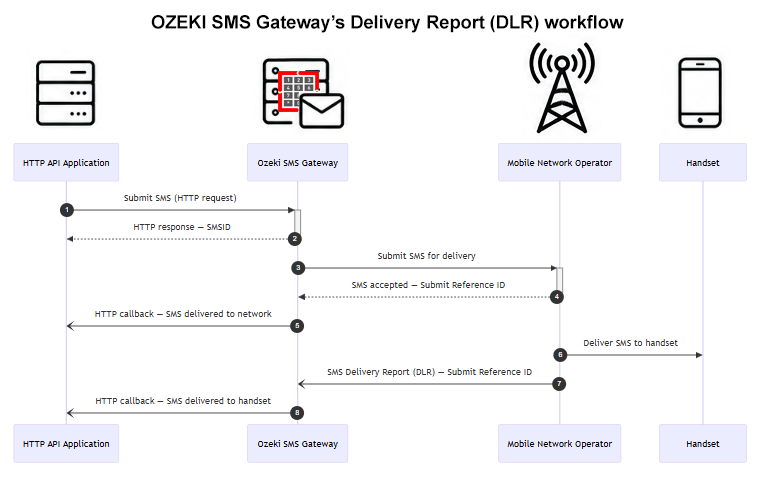
The delivery workflow steps are:
- Step 1: SMS is passed to Ozeki SMS Gateway by the HTTP API Application
- Step 2: Ozeki SMS Gateway returns the SMSID to the HTTP API Application in the HTTP response
- Step 3: Ozeki SMS Gateway sends the SMS to the Mobile Network Operator (MNO) for delivery
- Step 4: The Mobile Network Operator accepts the SMS for delivery and returns Submit Reference ID for the SMS
- Step 5: Ozeki SMS Gateway notifies the HTTP API Application with an HTTP callback about successful delivery to network
- Step 6: The Mobile Network Operator delivers the SMS to the handset successfully
- Step 7: The Mobile Network Operator sends an SMS Delivery Report (DLR) containing the Submit Reference ID back
- Step 8: Ozeki SMS Gateway notifies the HTTP API Application with an HTTP callback about successful delivery to handset
What happens inside Ozeki SMS Gateway during the delivery
If we look at the workflow steps in more detail and assume database reporting is configured you can understand what Ozeki SMS Gateway does during the delivery of a single SMS message.
- SMS is passed to Ozeki SMS Gateway by the HTTP API Application
- Ozeki SMS Gateway creates the SMS Message ID (SMSID) and returns the SMSID to the HTTP API Application in the HTTP response
- Ozeki SMS Gateway records the SMSID, the phone number and the text in the reporting database with status "created"
- Ozeki SMS Gateway sends the SMS to the Mobile Network Operator (MNO) for delivery
- The Mobile Network Operator accepts the SMS for delivery and returns Submit Reference ID for the SMS to Ozeki SMS Gateway
- Ozeki SMS Gateway updates the database record in the reporting database with "deliverytoconnectionsuccess"
- Ozeki SMS Gateway stores the Submit Reference ID linked to the SMS Message ID (SMSID) in the delivery report reference table (DLRTABLE)
- Ozeki SMS Gateway notifies the HTTP API Application with an HTTP callback about successful delivery to network
- The Mobile Network Operator delivers the SMS to the handset successfully
- The Mobile Network Operator sends an SMS Delivery Report (DLR) containing the Submit Reference ID back to Ozeki SMS Gateway
- Ozeki SMS Gateway receives the Submit Reference ID and finds the sms message with the help of the delivery report reference table (DLRTABLE)
- Ozeki SMS Gateway updates the database record in the reporting database with "deliverytorecipientsuccess"
- Ozeki SMS Gateway notifies the HTTP API Application with an HTTP callback about successful delivery to handset
- Ozeki SMS Gateway updates the SMS status to delivered on the GUI
SMS delivery status codes in Ozeki SMS Gateway
Every SMS protcol used for mobile network connections use different status codes. Ozeki SMS Gateway translates the mobile network specific / sms protocol specific codes to the following values to make sms delivery status information standard.
| Status code | Status message | Meaning |
| 0 | NotYetSubmitted | The message is still in the Ozeki outbox queue. It was not submitted to the network. |
| 1 | Submitted | The message was submitted to the network and received a submit reference. |
| 2 | PartiallySubmitted | Part of the message was submitted to the network with a submit reference. This is used for multipart messages, if all parts are submitted the message will move to submitted state. |
| 3 | Delivered | The message was delivered to the recipient terminal. |
| 4 | PartiallyDelivered | Part of the messages was delivered to the recipient terminal. This is used for multipart messages only, if all parts are delivered the message will move to delivered state. |
| 5 | Viewed | The message was viewed by the receiver. This state is triggered for chat messages only, SMS does not have such a state. |
| 6 | SubmitFailed | The message submission failed. Check the status message for the reason. |
| 7 | DeliveryFailed | The message was submitted to the network, but the network could not deliver it to the recipient terminal. Check the status message for the reason. |