
HTTP SMS API overview
The Ozeki HTTP SMS REST API (v2) provides a unified, programmable interface for bidirectional SMS messaging, delivery lifecycle tracking, and real-time event webhooks over HTTP and HTTPS. Applications can dispatch single or batch text and binary SMS messages, poll delivery states, manage account-level webhook subscriptions, and receive automated reverse HTTP callbacks for incoming messages and delivery status transitions.
Table of contents
Overview and architecture
This section describes the big picture: the two parties in the exchange, who initiates each request type, and in which direction the JSON payloads travel.
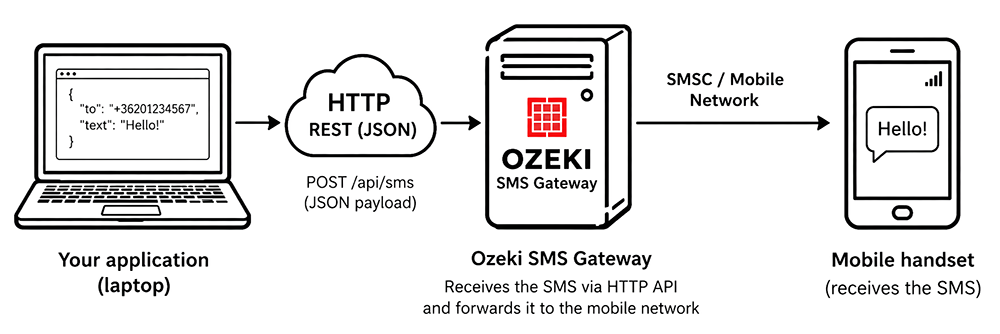
Two parties communicate in this API:
- Your application — the HTTP client you develop.
- Ozeki SMS Gateway — the HTTP server connected to the mobile network.
Your application submits messages and queries status by calling REST resources on the gateway (such as POST /api/v2/messages). For delivery reports and incoming messages the direction reverses: the gateway becomes the HTTP client and sends signed HTTP POST requests carrying event batches to a webhook URL that your application exposes. Every request and response with a payload carries a JSON body with the content type application/json.
Enable the API by creating an HTTP user
Before your application can use the API, you have to create an HTTP user account in Ozeki SMS Gateway. This account represents your application and holds its configuration, such as its API key and its callback settings. Figure 2 shows where to create it.
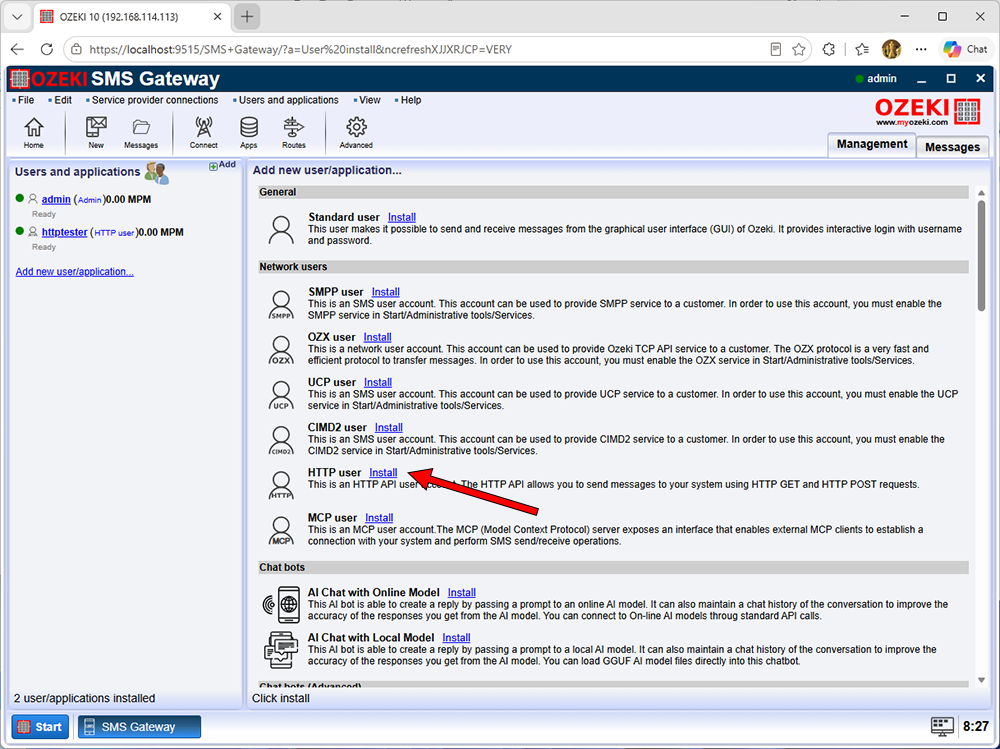
For more detailed instructions on how to create an HTTP user in Ozeki SMS Gateway, please read the following page: How to provide HTTP SMS service
Copy the API key from the HTTP user
The API key authenticates your application. You generate it on the configuration page of the HTTP user and put it into the Bearer authorization header of every request. Figure 3 shows how to generate and copy the key.
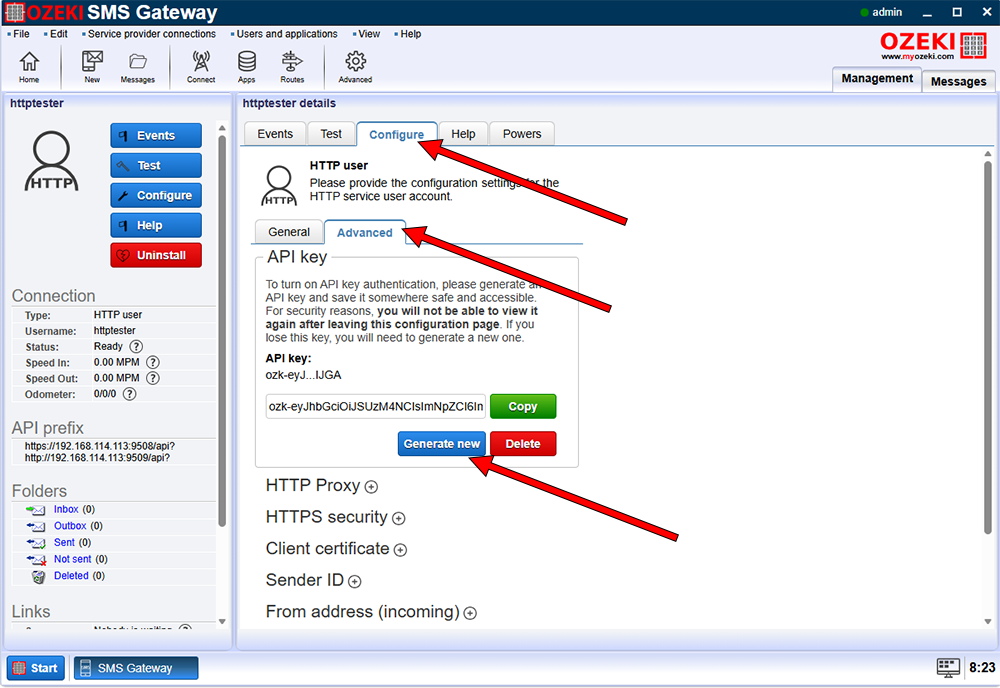
For more detailed instructions on how to generate and copy an HTTP API key, please read the following page: How to provide HTTP SMS service
Base path & user context
All API operations operate relative to the V2 base path. The user account context is resolved implicitly from the authentication credentials supplied in the Authorization request header:
http://localhost:9509/api/v2
Authentication
Every request to the gateway must include a valid Authorization header. Two authentication schemes are supported:
- Bearer Token (API Key):
Authorization: Bearer <api_key> - Basic Authentication:
Authorization: Basic <base64(username:password)>
Requests with missing or invalid credentials are rejected with 401 Unauthorized.
Data format conventions
- Media type: All request payloads with a body and all response bodies use
Content-Type: application/json. - Property naming: JSON field names are strictly case-sensitive and follow
camelCase. - Null omission: Properties with
nullvalues are omitted from serialized JSON responses rather than output as explicit nulls. - Timestamps: All dates and timestamps use ISO 8601 extended format with timezone offsets (e.g.,
"2026-10-21T10:21:00+02:00"). - Phone numbers: All sender and recipient phone numbers follow the E.164 international standard format (e.g.,
"+36201002000").
Quick start
To send your first text SMS message immediately, issue an authenticated HTTP POST request to the /api/v2/messages endpoint:
Request
POST /api/v2/messages HTTP/1.1
Host: localhost:9509
Authorization: Bearer <api_key>
Content-Type: application/json

{
  "from": "+36201002000",
  "to": "+36201002001",
  "content": "Hello from Ozeki SMS Gateway!"
}
Response (201 Created)
Response headers:
Location:/api/v2/messages/26385eed-6a6c-4deb-b549-dc055211a71dContent-Type:application/json
{
  "messageId": "26385eed-6a6c-4deb-b549-dc055211a71d",
  "folder": "outbox",
  "from": "+36201002000",
  "to": "+36201002001",
  "type": "text",
  "content": "Hello from Ozeki SMS Gateway!",
  "status": "queued",
  "statusDescription": "Accepted for delivery",
  "createdAt": "2026-10-21T10:21:00+02:00",
  "scheduledAt": "2026-10-21T10:21:00+02:00",
  "expiresAt": "2026-10-28T10:21:00+02:00",
  "updatedAt": "2026-10-21T10:21:00+02:00"
}
Note: A 201 Created response confirms that the SMS has been accepted and queued for outbound dispatch. Use the returned messageId to query delivery status or configure webhooks for automated status callbacks.
API catalog
The API is structured into three dedicated sub-modules:
Messages API
Handles all outbound message dispatching, queue management, polling, and deletion. Supports single and bulk messaging, text and binary SMS payloads, deferred dispatch, expiration windows, and projection views.
Detailed guide: See Messages API overview for core concepts (folders, delivery statuses, views) and visual sequence diagrams for messaging workflows.
| HTTP method | Endpoint path | Description | Documentation |
POST |
/api/v2/messages |
Send a single SMS message (text or binary). | send_a_message.html |
POST |
/api/v2/messages:batchSend |
Dispatch multiple SMS messages with shared defaults in a single batch. | send_multiple_messages.html |
GET |
/api/v2/messages/{messageId} |
Retrieve a single message by ID with configurable view projections. | retrieve_a_message.html |
GET |
/api/v2/messages |
List and filter messages across folders with pagination. | list_messages.html |
DELETE |
/api/v2/messages/{messageId} |
Permanently delete a message by ID across any folder. | delete_a_message.html |
POST |
/api/v2/messages:batchGet |
Query multiple messages in a single batch request (up to 100 IDs). | batch_get_messages.html |
POST |
/api/v2/messages:batchDelete |
Permanently delete multiple messages in a single batch request. | batch_delete_messages.html |
Webhook API
Allows your application to manage account-level webhook subscriptions. Each user account supports one active webhook configuration with an automated signing secret (whsec_...) used to authenticate callback deliveries.
Detailed guide: See Webhook API overview for subscription rules, POST vs. PUT behavior, secret rotation, and signature generation.
| HTTP method | Endpoint path | Description | Documentation |
POST |
/api/v2/webhook |
Register a new webhook subscription and generate a signing secret. | configure_webhook.html |
PUT |
/api/v2/webhook |
Create or replace the webhook subscription and rotate the signing secret. | configure_webhook.html |
GET |
/api/v2/webhook |
Retrieve the active webhook subscription (secret omitted). | retrieve_webhook.html |
DELETE |
/api/v2/webhook |
Remove the active webhook subscription. | delete_webhook.html |
Callbacks API
Defines reverse HTTP webhook dispatches sent by Ozeki SMS Gateway to your client-hosted webhook endpoint. Callbacks are delivered as JSON arrays of event envelopes with HMAC-SHA256 signature verification (X-Hub-Signature-256) and quadratic backoff retry policies.
Detailed guide: See Callbacks API overview for envelope schemas, event batching, retry timing formulas, and signature verification instructions.
Event type (type) |
Payload model | Description | Documentation |
"message.received" |
MessageReceivedPayload |
Triggered when a new inbound SMS arrives in the user's inbox. |
webhook_message_received.html |
"message.status.updated" |
MessageStatusUpdatedPayload |
Triggered when an outbound SMS transitions delivery status. | webhook_message_status_updated.html |
Error handling
When a request cannot be processed due to invalid authentication, missing parameters, or business validation failures, the API returns a standard ApiErrorResponse object:
Error schema (ApiErrorResponse)
| Field | Type | Description |
error.code |
integer | HTTP status code matching the response status. |
error.description |
string | Human-readable explanation of the specific error. |
error.action |
string | Recommended action to resolve the issue. |
error.timestamp |
string (ISO 8601) | Timestamp when the error was evaluated. |
Common error status codes
| Status code | Condition | Description |
401 Unauthorized |
Missing or invalid credentials | Credentials were not provided or could not be authenticated. |
404 Not Found |
Resource not found | The requested message ID or webhook subscription does not exist. |
409 Conflict |
Resource conflict | A webhook already exists when attempting POST /api/v2/webhook. |
422 Unprocessable Entity |
Validation failure | Request syntax is invalid, required fields are missing, or constraints failed. |