
How to Migrate from Jasmin to Ozeki SMS Gateway: Step-by-Step Guide
A Jasmin migration is mostly gateway side work. Because Ozeki SMS Gateway implements the Jasmin /send HTTP API, your applications keep calling the same interface with the same parameters, so no application code has to be rewritten. The effort concentrates on four areas: recreating your SMPP client connectors, your user accounts and groups, your MT routing rules, and your delivery report handling. This guide walks through each of them, from collecting your current configuration to a controlled cutover with a rollback plan. For an overview of why users switch, see our Jasmin alternative page.
Overview
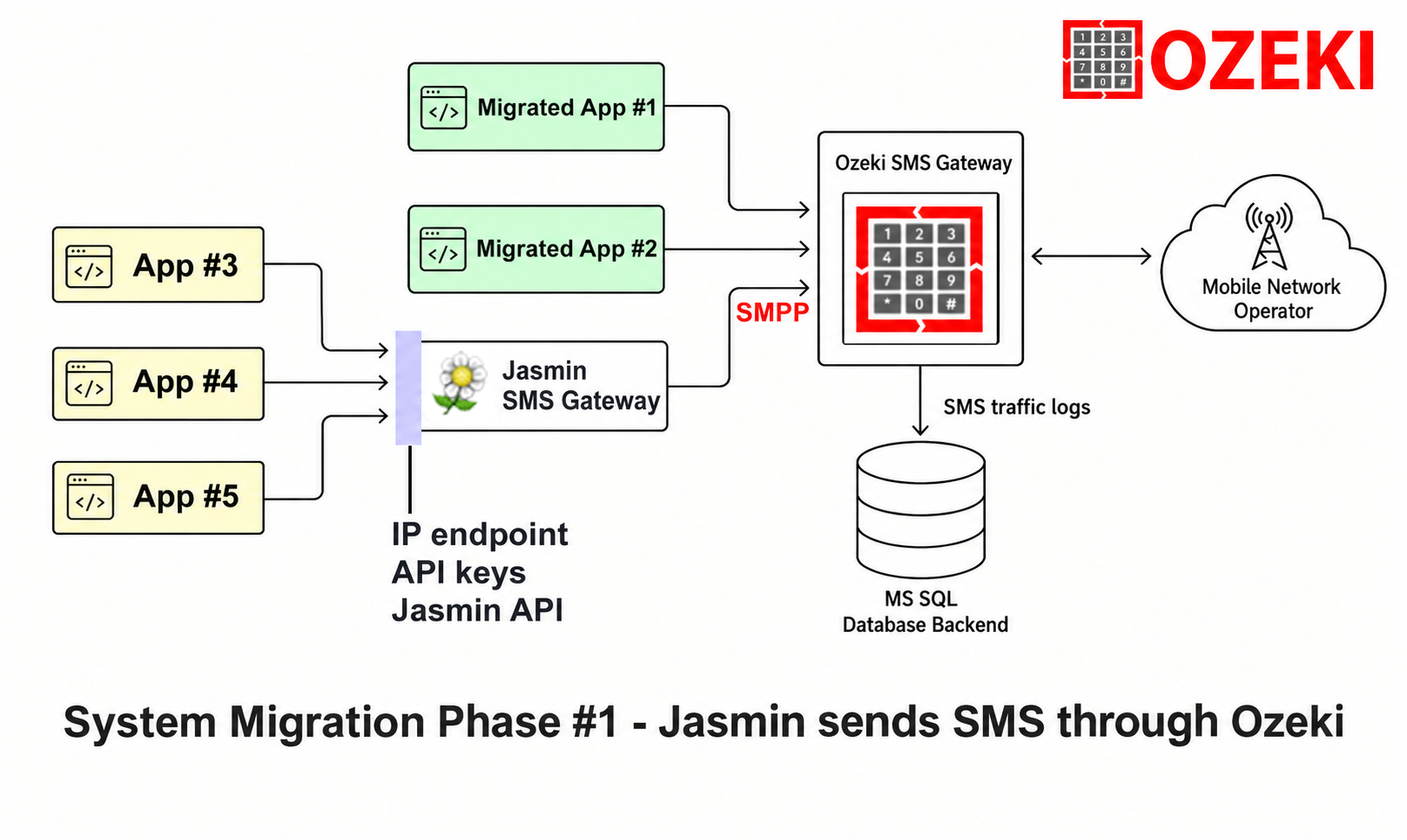
We recommend a two phase Migration procedure from the existing system (Jasmin) to the new (Ozeki):
Phase #1: Mobile Network Connection migration (Figure 1). Jasmin is kept in operation, but the mobile network connections are migrated to Ozeki SMS Gateway. In this phase Jasmin is reconfigured to connect to Ozeki SMS Gateway through SMPP. Jasmin sees Ozeki SMS Gateway as its primary mobile network link, and the traffic is routed through Ozeki SMS Gateway. In this phase some apps, that are easy to configure, can be configured to connect to Ozeki's APIs directly.
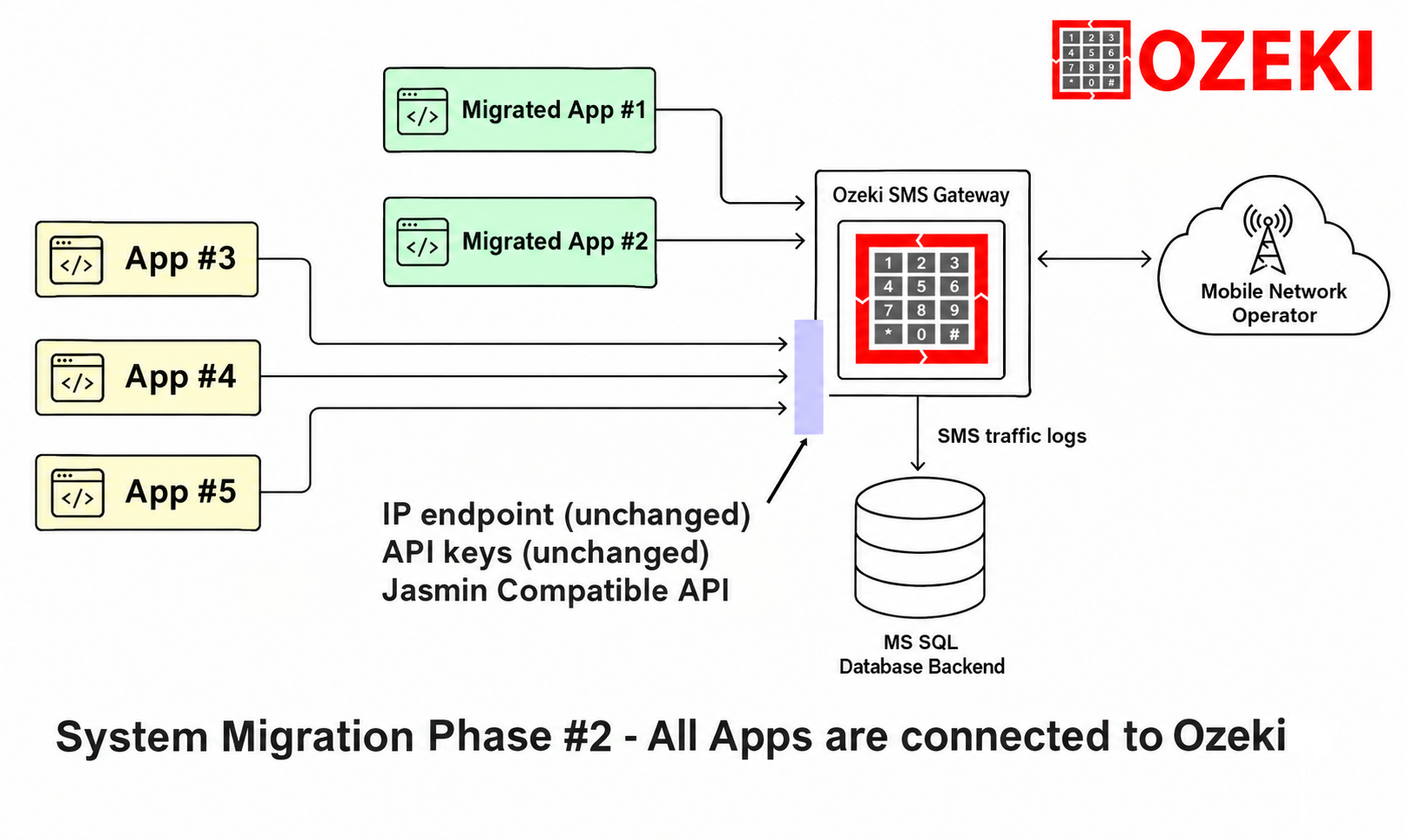
Phase #2: App migration. Jasmin is switched off, and the built in Jasmin compatible API of Ozeki SMS Gateway is used to serve the current apps. The API credentials and network endpoints (IP address, port) are moved to the Ozeki SMS Gateway system. The apps do not notice, that a new SMS gateway is serving them. The Apps do not need to be changed.
Pre-Migration Checklist
Start by documenting your current Jasmin deployment. Jasmin keeps its system level settings in /etc/jasmin/jasmin.cfg (INI format), while connectors, users, groups, filters and routes are stored at runtime and managed through the jcli telnet console. Collect the following before you install anything:
- All SMPP client connectors from smppccm: connector id (cid), host, port, username, password, bind type, system type, TON/NPI settings, and the submit_throughput limit
- All users from user and their groups from group: username, password, uid, gid, and the mt_messaging_cred authorizations, value filters, default values and quotas
- Routing configuration: the ordered MT routing table from mtrouter, including route types (DefaultRoute, StaticMTRoute, RandomRoundrobinMTRoute, FailoverMTRoute), filters and connector references
- All filters from filter: TransparentFilter, UserFilter, GroupFilter, SourceAddrFilter, DestinationAddrFilter, ShortMessageFilter, DateIntervalFilter, TimeIntervalFilter, TagFilter, EvalPyFilter
- Delivery report setup: the dlr-url, dlr-level and dlr-method values your applications pass, plus the [dlr-thrower] section of jasmin.cfg
- The [http-api] section of jasmin.cfg: bind address and port (default 1401)
- The exact /send URL your applications call, including host, port, and parameters
- User quotas (balance, sms_count, http_throughput, smpps_throughput), because Jasmin users require sufficient credit to send
These commands extract the relevant information from your running Jasmin instance:
jcli : smppccm -l
jcli : user -l
jcli : group -l
jcli : mtrouter -l
jcli : filter -l
And from the configuration file:
grep -n -A 8 "\[http-api\]" /etc/jasmin/jasmin.cfg
grep -n -A 6 "\[dlr-thrower\]" /etc/jasmin/jasmin.cfg
Keep a backup of jasmin.cfg and a transcript of your jcli listings. You will use them as the reference during every step below.
Step 1: Install Ozeki SMS Gateway
Download Ozeki and install it on Windows, where it runs as a native service, or on Linux. After installation, open the web based management GUI in your browser. There are no config files to edit and no syntax errors that can stop the gateway from starting. All further configuration happens in the GUI.
Step 2: Recreate Your SMSC Connections
In the Ozeki GUI, open the connections menu and add a new connection for each SMPP client connector in your Jasmin smppccm list. Map the settings as follows:
| Jasmin smppccm setting | Ozeki SMPP connection |
|---|---|
| cid | Connection name / id |
| host | SMSC host address |
| port | SMSC port |
| username | Username (system_id) |
| password | Password |
| systype | System type |
| bind = transceiver | Bind type: transceiver |
| bind = transmitter / receiver | Bind type: transmitter and receiver |
| submit_throughput | Throughput limit (messages per second) |
| elink_interval | Enquire link interval |
| con_loss_delay, con_fail_delay | Reconnect delays after connection loss or failure |
| ssl | TLS encryption on the connection |
If your Jasmin connectors set src_ton, src_npi, dst_ton or dst_npi, enter the same values in the advanced options of the Ozeki connection. The src_addr default sender, coding default data coding, and validity default validity period can be reproduced as connection defaults in Ozeki. If you also used HTTP client connectors (httpccm) to receive mobile originated messages in Jasmin, recreate them in Ozeki as HTTP client connections with the same base URL and method.
Step 3: Recreate Your User Accounts and Groups
In Jasmin every user belongs to a group and holds messaging credentials (mt_messaging_cred) and optional SMPP server credentials (smpps_cred). Create the same user accounts in Ozeki with the same username and password, so your applications do not need new credentials:
| Jasmin user setting | Ozeki user account |
|---|---|
| username, password | Username and password (keep identical) |
| gid | User group (permissions and routing scope) |
| mt_messaging_cred defaultvalue src_addr | Default sender address |
| mt_messaging_cred valuefilter src_addr / dst_addr | Source / destination address restrictions on the user |
| mt_messaging_cred authorization http_send, src_addr, dlr_level, ... | API permissions on the user account |
| mt_messaging_cred quota balance / sms_count | Message and credit limits |
| mt_messaging_cred quota http_throughput | Throughput / rate limit for the user |
| smpps_cred quota max_bindings | Maximum simultaneous SMPP server connections |
Pay special attention to quotas. Jasmin rejects submissions when a user runs out of balance or message credit, so if your applications rely on unlimited sending, set the corresponding limits to unlimited in Ozeki as well.
Step 4: Set Up Routing Rules
In Jasmin, outbound routing is defined by the ordered MT routing table managed with mtrouter. Each route combines one or more filters with a connector, and routes can be static, random round robin, or failover. In Ozeki, routing is a single rules table. Create one rule for each route you documented in the checklist, matching on destination prefix or sender address and directing traffic to the correct SMSC connection. Routing rules are evaluated in order, just like in Jasmin, and you can test them immediately by sending a message from the GUI. Use Ozeki's alternative route feature to reproduce the failover and load balancing behavior of your Jasmin FailoverMTRoute and RandomRoundrobinMTRoute definitions.
Step 5: Configure Delivery Reports
Jasmin tracks delivery reports per message when dlr=yes is passed, stores them internally, and forwards them to the dlr-url callback with the id, message_status, level and connector parameters. Ozeki stores every message and its status internally as well, so there is nothing extra to install. If your applications receive callbacks through dlr-url, keep using them: Ozeki forwards delivery reports to your callback URL with the same parameter names, including the message_status value and the ACK acknowledgement behaviour your receiver already implements. You can also browse per-message delivery status in the GUI or write reports to your own SQL database. Details are on our Jasmin DLR alternative page.
Step 6: Test with Your Existing /send URL
Take the exact request your applications send today and change only the host and port to point at your Ozeki server. The path and parameters stay the same:
http://ozeki-server.example.com:PORT/send?username=jasmin_user&password=secret&to=%2B36201234567&
from=MyApp&content=Migration+test&dlr=yes&dlr-url=http%3A%2F%2Fapp.example.com%2Fdlr&dlr-level=2&dlr-method=GET
Verify three things: the success response is returned (the familiar Success "uuid" body), the message arrives on a test phone, and the delivery report callback fires with the expected message_status. Repeat the test with a long concatenated message and a UTF-8 message containing special characters submitted with coding=8 (UCS2), since these exercise UDH and encoding handling. The full parameter reference is on the Jasmin compatible HTTP API page.
Cutover Strategies and Rollback Plan
Choose one of two cutover approaches:
Parallel run (recommended)
Keep Jasmin running while Ozeki runs alongside it. Point test and low risk applications at Ozeki first, watch both gateways for a few days, then move production traffic. The simplest way to flip traffic is to place a DNS name or reverse proxy in front of the /send endpoint. Cutover then becomes a single DNS or proxy change instead of edits in every application.
Direct switch
For smaller deployments, stop the Jasmin HTTP API listener, redirect the /send port to Ozeki, and run a verification pass with your test URL. This takes minutes but leaves less room for observation before traffic flows.
Rollback
Because the original Jasmin installation is untouched during a parallel run, rollback means pointing the DNS name or proxy back to the old gateway. No application changes are required on either side, which is the main benefit of the compatible API approach.
Common Pitfalls and How to Avoid Them
Several common pitfalls can arise during the migration, and knowing how to handle them will make the cutover smoother. If operators reject sender IDs after the switch, compare the TON and NPI settings on the Ozeki SMPP connection with your old Jasmin src_ton, src_npi, dst_ton and dst_npi values. Similarly, if your SMSC required a specific coding or character encoding in Jasmin, set the equivalent encoding in the Ozeki connection options. Throughput is another area to watch: match your old submit_throughput value, otherwise the SMSC may reject submits under load. Firewall rules also need attention, since Jasmin used port 1401 for its HTTP API and 8990 for the jcli telnet console, so update your firewall and application configurations for the ports your Ozeki installation uses. If delivery reports seem to disappear, confirm that your application URL is reachable from the Ozeki server and test with dlr=yes, dlr-level=2 and dlr-method=GET to receive both submit and delivery status. Finally, before going live, check every route order and filter from mtrouter -l against your new routing table to eliminate any prefix routing gaps, and verify that user quotas in Ozeki are set to match (or exceed) the limits your Jasmin users had.
The result
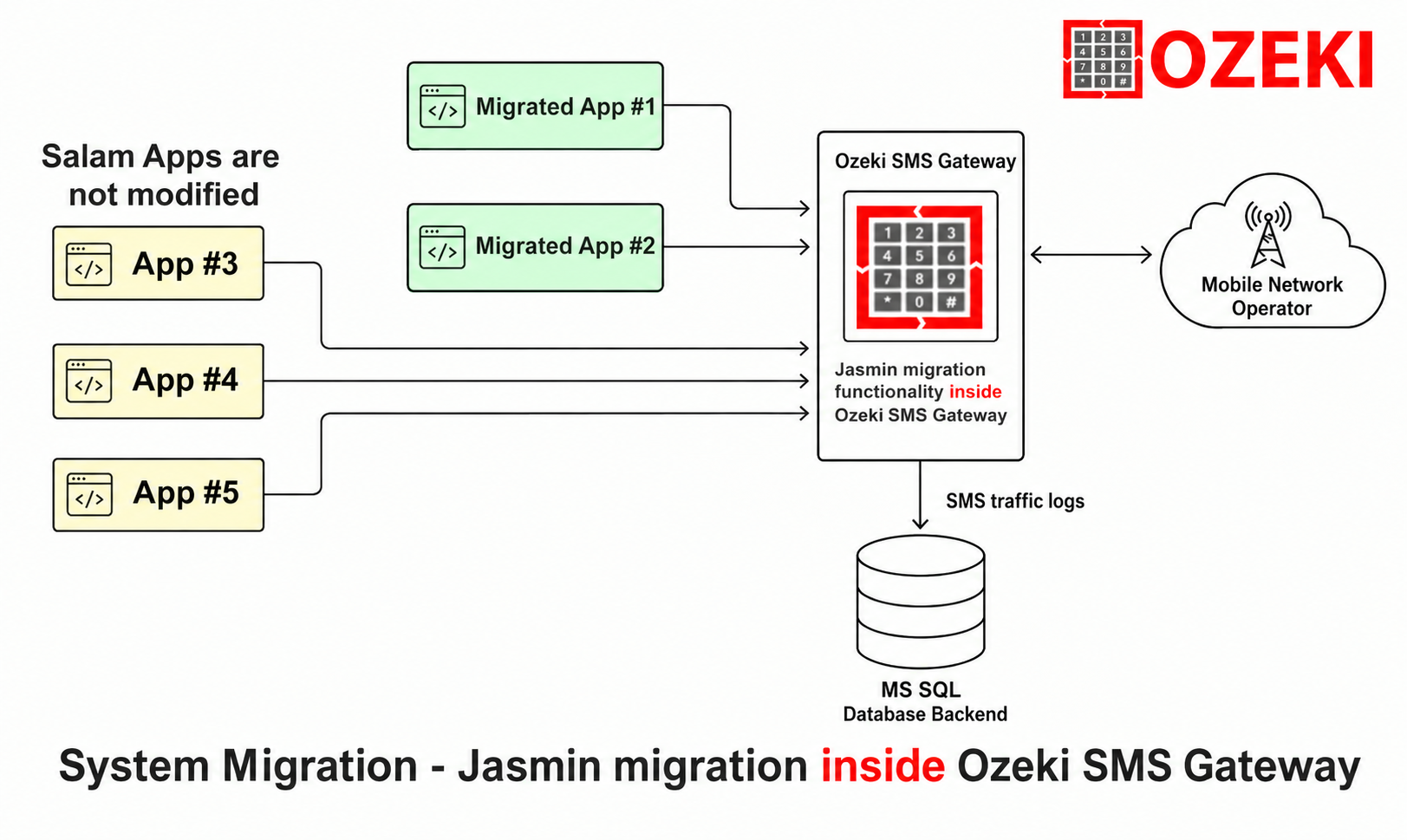
Once the migration is done, your apps will be served by Ozeki SMS Gateway through the built in Jasmin compatible API (Figure 3).
Get Help with Your Migration
Most teams complete this migration in a single day, and you can evaluate the entire process with the free trial. If you prefer assistance, our engineers offer migration consulting, including a review of your jasmin.cfg and jcli configuration and a prepared Ozeki setup.