# OZEKI HTTP SMS API (JSON)
Ozeki SMS Gateway provides an HTTP API that lets your application send and receive SMS messages by exchanging JSON documents over HTTP or HTTPS. This document is a practical guide to the API. It explains how to create an HTTP API user and an API key, lists the URL and the HTTP headers your requests must use, and demonstrates the most important operations with ready-to-use JSON examples: sending SMS messages, downloading incoming messages, and receiving them automatically through HTTP callbacks. It also documents the standard delivery status codes, so you can follow every message from submission to delivery.
## Table of Contents
## Introduction
- [Overview and architecture](#overview)
- [Enable the API by creating an HTTP API user](#create-http-api-user)
- [Copy the API key from the HTTP API user](#copy-api-key)
- [Your HTTP API URL](#http-api-url)
- [Authentication](#authentication)
## Send an SMS
- [Send an SMS message without callback (overview)](#send-without-callback)
- [Send an SMS message](#send-sms)
- [Send multiple SMS messages](#send-multiple)
- [Download status information of sent SMS messages](#sendquery)
- [Delete sent SMS messages from the SMS Gateway](#delete-sent)
## Receive an SMS
- [Receive an SMS message without callback (overview)](#receive-without-callback)
- [Download incoming SMS messages](#receive)
- [Delete incoming SMS messages from the SMS Gateway](#delete-incoming)
## Send an SMS with callbacks
- [How to send an SMS and query it's status with callbacks](#send-with-callbacks)
- [Send an SMS message with a callback URL for status updates](#send-with-reporturl)
## Receive an SMS with callbacks
- [How to receive SMS messages with callbacks (overview)](#receive-with-callbacks)
- [Receive SMS messages with HTTP callbacks](#receive-callbacks)
- [Cancel receiving with HTTP callbacks](#unregisterurl)
## Additional information
- [SMS delivery status codes in Ozeki SMS Gateway](#status-codes)
- [Data format conventions](#conventions)
- [Conclusion](#conclusion)
## Overview and architecture
This section describes the big picture: the two parties in the exchange, who initiates each request type, and in which direction the JSON payloads travel.
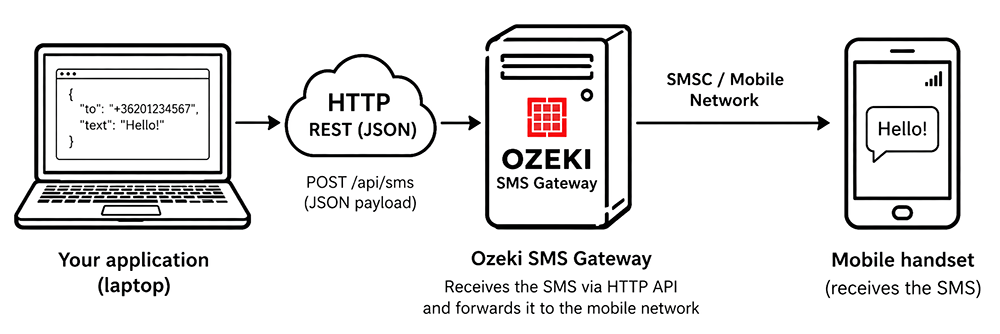Figure - Overview and architecture
Two parties communicate in this API:
- **Your application** — the HTTP client you develop.
- **Ozeki SMS Gateway** — the HTTP server connected to the mobile network.
Your application submits messages and queries status by calling resources on the gateway. For delivery reports and incoming messages the direction reverses: the gateway becomes the HTTP client and POSTs a signed JSON body to a callback URL that your application exposes. Every request and response carries a JSON body with the content type `application/json; charset=utf-8`.
## Enable the API by creating an HTTP API user
Before your application can use the API, you have to create an HTTP API user account in Ozeki SMS Gateway. This account represents your application and holds its configuration, such as its API key and its callback settings. Figure 2 shows where to create it.
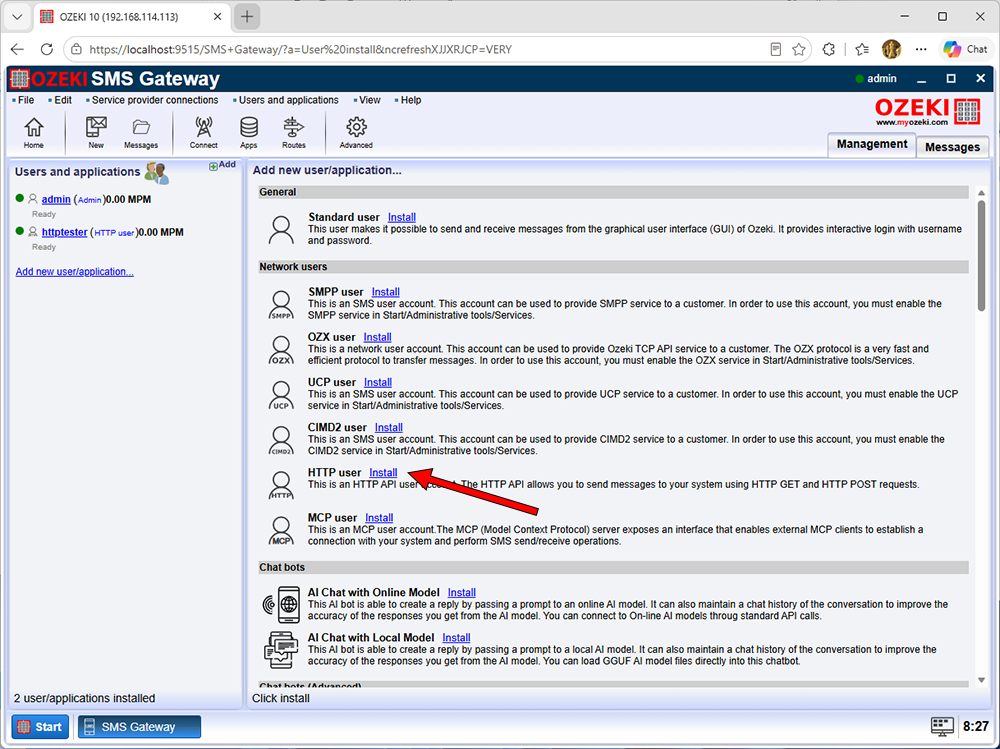Figure - Create an HTTP API user account
For more detailed instructions on [how to create an HTTP API user in Ozeki SMS Gateway](p_1140-how-to-provide-http-sms-service__FR.html), please read the following page:
## Copy the API key from the HTTP API user
The API key authenticates your application. You generate it on the configuration page of the HTTP API user and put it into the Bearer Authorization header of every request. Figure 3 shows how to generate and copy the key.
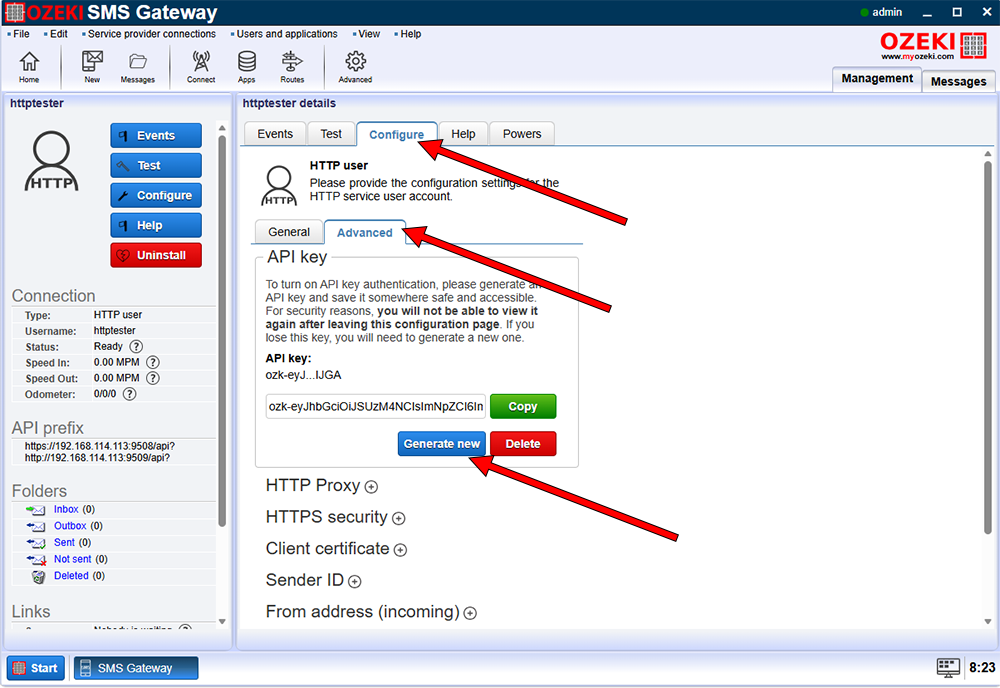Figure - Generate an API key for Bearer Authorization
For more detailed instructions on [how to generate and copy an HTTP API key](p_1140-how-to-provide-http-sms-service__FR.html), please read the following page:
## Your HTTP API URL
Your application sends its requests to the HTTP API service of Ozeki SMS Gateway. Send every request as HTTP POST with a JSON body to one of the URLs below, attach your API key as a Bearer token, and set the content type of the request to application/json; charset=utf-8. In production, always use the HTTPS URL.
| HTTP method: | POST |
| --- | --- |
| HTTP URL: | http://your.gateway.ip:9509/api |
| HTTPS URL: | https://your.gateway.ip:9508/api |
| Authorization: | Bearer ozk-eyJhbGciOiJSUzM... (The API key you have created) |
| Content-Type: | application/json; charset=utf-8 |
## Authentication
Every request must authenticate the caller with the API key issued to the HTTP API user, sent as an OAuth-style Bearer token in the `Authorization` header. Requests without a valid key are rejected with HTTP 401 and an error envelope.
```
POST /api HTTP/1.1
Host: your.gateway.ip:9508
Authorization: Bearer ozk-eyJhbGciOiJSUzM...
Content-Type: application/json; charset=utf-8
```
- The API key is a secret. Store it in a secrets manager or server-side configuration — never in client-side code, repositories or logs.
- Create a separate API user (and therefore a separate key) per application, so permissions can be restricted and keys can be revoked independently.
- Rotate keys periodically; generating a new key in the gateway immediately supersedes the old one.
## Send an SMS message without callback (overview)
**How to send an SMS without callbacks:**
1. Send the SMS to the SMS Gateway.
2. Download status information using polling.
3. Delete the SMS from the SMS Gateway.
```mermaid
sequenceDiagram
autonumber
participant App as HTTP API Application
participant GW as Ozeki SMS Gateway
participant MNO as Mobile Network Operator
participant HS as Handset
Note over App,GW: 1. Send the SMS to the SMS Gateway
App->>+GW: POST /api — action: send (recipient, message)
GW-->>-App: sendresp — messageid, statuscode 0 acceptedfordelivery
GW->>+MNO: Submit SMS for delivery
MNO-->>-GW: SMS accepted — submit reference
MNO->>HS: Deliver SMS to handset
MNO-)GW: Delivery report (DLR) — final status recorded
Note over App,GW: 2. Download status information using polling
loop Poll until the message reaches a final state
App->>+GW: POST /api — action: sendquery (messageids)
GW-->>-App: sendqueryresp — statuscode, statusmessage
end
Note over App,GW: 3. Delete the SMS from the SMS Gateway
App->>+GW: POST /api — action: delete (messageids)
GW-->>-App: deleteresp — statuscode 13 deleted
```
## Send an SMS message
Use the send action to submit one or more SMS messages to the gateway. The gateway accepts the messages into its outbox queue and returns a unique messageid for each of them.
This request is initiated by **"Your application"** and is sent to **"Ozeki SMS Gateway"** using an HTTP or HTTPS POST request.
Request:
```
{
"action": "send",
"messages": [
{
"recipient": "+36201234567",
"message": "Hello World"
}
]
}
```
Response:
```
{
"action": "sendresp",
"messages": [
{
"statuscode": 0,
"statusmessage": "acceptedfordelivery",
"messageid": "26385eed-6a6c-4deb-b549-dc055211a71d",
"timestamp": "2026-10-02T08:49:11+02:00",
"recipient": "+36201234567",
"message": "Hello World"
}
]
}
```
If multiple messages are submitted, the response array maintains the order of the messages in the original request.
Optional request parameters:
- **sender:** can be used to specify a customer SenderID. It can be a phone number, a short code or an alphanumeric sender address. By default it is assigned by the mobile network connection.
- **messagetype:** can be used to define a custom message type. By default it is set to "SMS:TEXT".
The response is returned in the HTTP response body. Ozeki SMS Gateway assigns a unique messageid to the submitted SMS message and returns the registered timestamp, showing when the SMS message was accepted for delivery.
## Send multiple SMS messages
Use the send action to submit several SMS messages to the gateway in one request. The gateway accepts the messages into its outbox queue and returns a unique messageid for each of them.
This request is initiated by **"Your application"** and is sent to **"Ozeki SMS Gateway"** using an HTTP or HTTPS POST request.
Request:
```
{
"action": "send",
"messages": [
{
"recipient": "+36201234567",
"message": "Hello World"
},
{
"recipient": "+36209876543",
"message": "This is the second message"
},
{
"recipient": "+36201112233",
"message": "This is the third message"
}
]
}
```
Response:
```
{
"action": "sendresp",
"messages": [
{
"statuscode": 0,
"statusmessage": "acceptedfordelivery",
"messageid": "3f6a9c1e-8d4b-4e7f-9a2c-5b8d1e0f7a63",
"timestamp": "2026-10-02T08:49:11+02:00",
"recipient": "+36201234567",
"message": "Hello World"
},
{
"statuscode": 0,
"statusmessage": "acceptedfordelivery",
"messageid": "7b2e4d9f-1c5a-4f8b-8e3d-6a9c2b5f0e41",
"timestamp": "2026-10-02T08:49:12+02:00",
"recipient": "+36209876543",
"message": "This is the second message"
},
{
"statuscode": 0,
"statusmessage": "acceptedfordelivery",
"messageid": "9c1e5f3a-7d2b-4a9c-8e6f-3b8d4c1a7f52",
"timestamp": "2026-10-02T08:49:12+02:00",
"recipient": "+36201112233",
"message": "This is the third message"
}
]
}
```
Each element of the response array corresponds to the message at the same position in the request array, so you can match every returned messageid to the submitted message. The request and response parameters are the same as for sending a single message.
## Download status information of sent SMS messages
Use the sendquery action to download the current delivery status of the SMS messages you have sent. The request must contain the list of messageids returned by the send action, and the gateway returns the latest statuscode and statusmessage for each of them.
This request is initiated by **"Your application"** and is sent to **"Ozeki SMS Gateway"** using an HTTP or HTTPS POST request.
Request:
```
{
"action": "sendquery",
"messageids": [
"3f6a9c1e-8d4b-4e7f-9a2c-5b8d1e0f7a63",
"7b2e4d9f-1c5a-4f8b-8e3d-6a9c2b5f0e41"
]
}
```
Response:
```
{
"action": "sendqueryresp",
"messages": [
{
"messageid": "3f6a9c1e-8d4b-4e7f-9a2c-5b8d1e0f7a63",
"statuscode": 4,
"statusmessage": "delivered",
"timestamp": "2026-10-02T09:12:44+02:00",
"recipient": "+36201234567"
},
{
"messageid": "7b2e4d9f-1c5a-4f8b-8e3d-6a9c2b5f0e41",
"statuscode": 8,
"statusmessage": "deliveryfailed",
"timestamp": "2026-10-02T09:10:03+02:00",
"recipient": "+36209876543",
"errormessage": "No subscriber found by this MSISDN"
}
]
}
```
The response returns a statuscode and a statusmessage for each of the submitted messageids, so you can follow every message from submission to delivery. If a queried message does not exist in Ozeki SMS Gateway, the response returns the statuscode 14 with the statusmessage "notfound" for that messageid.
## Delete sent SMS messages from the SMS Gateway
After a sent SMS message has reached its final state, you can issue a delete request to remove it from Ozeki SMS Gateway. The delete request must contain the list of messageids of the messages to be deleted. These messageids are returned by the send action in its response.
This request is initiated by **"Your application"** and is sent to **"Ozeki SMS Gateway"** using an HTTP or HTTPS POST request.
Request:
```
{
"action": "delete",
"messageids": [
"7acf71f7-b30f-4112-bf9f-0075a6f1014b",
"ef7fb0c5-e23a-4e9d-ae53-4685d1354f74"
]
}
```
Response:
```
{
"action": "deleteresp",
"messages": [
{
"messageid": "7acf71f7-b30f-4112-bf9f-0075a6f1014b",
"statuscode": 13,
"statusmessage": "deleted"
},
{
"messageid": "ef7fb0c5-e23a-4e9d-ae53-4685d1354f74",
"statuscode": 13,
"statusmessage": "deleted"
}
]
}
```
The response returns a statuscode and a statusmessage for each of the submitted messageids, so you can verify that every message was deleted from the folder.
## Receive an SMS message without callback (overview)
**How to receive an SMS without callbacks:**
1. Download the incoming SMS from the Gateway.
2. Delete the downloaded incoming SMS from the SMS Gateway.
```mermaid
sequenceDiagram
autonumber
participant App as HTTP API Application
participant GW as Ozeki SMS Gateway
participant MNO as Mobile Network Operator
participant SH as Sending handset
SH->>MNO: Send SMS to the recipient
MNO->>GW: Deliver SMS to the gateway
Note over GW: SMS stored in the inbox folder
Note over App,GW: 1. Download the incoming SMS from the Gateway
App->>+GW: POST /api — action: receive (folder: inbox, limit)
GW-->>-App: receiveresp — messages (messageid, sender, text)
Note over App,GW: 2. Delete the downloaded incoming SMS from the SMS Gateway
App->>+GW: POST /api — action: delete (messageids)
GW-->>-App: deleteresp — statuscode 13 deleted
```
## Download incoming SMS messages
Use the receive action to download messages stored in one of the folders of Ozeki SMS Gateway. You can control how many messages you download in one request.
This request is initiated by **"Your application"** and is sent to **"Ozeki SMS Gateway"** using an HTTP or HTTPS POST request.
Request:
```
{
"action": "receive",
"folder": "inbox",
"limit": 2
}
```
Response:
```
{
"action": "receiveresp",
"messages": [
{
"messageid": "7acf71f7-b30f-4112-bf9f-0075a6f1014b",
"timestamp": "2026-10-02T08:48:24+02:00",
"messagetype": "SMS:TEXT",
"sender": "+36301234567",
"recipient": "+36201111111",
"message": "Hello World"
},
{
"messageid": "ef7fb0c5-e23a-4e9d-ae53-4685d1354f74",
"timestamp": "2026-10-02T08:49:11+02:00",
"messagetype": "SMS:TEXT",
"sender": "+36301234567",
"recipient": "+36201111111",
"message": "Nice to meet you"
}
]
}
```
Request parameters:
- **folder:** can be "inbox", "outbox", "sent", "delivered" or "failed".
- **limit:** specifies the number of messages to download in one go. It should be between 1 and 1000. If it is not specified, 100 is used as the default.
The receive action does not delete the downloaded messages from Ozeki SMS Gateway. After you have downloaded the messages from the inbox, you should issue a delete request containing the list of messageids you want to remove. For details, see the "Delete incoming SMS messages from the SMS Gateway" section below.
## Delete incoming SMS messages from the SMS Gateway
After downloading the incoming messages from the inbox, you should issue a delete request to remove them from Ozeki SMS Gateway. Otherwise the same messages will be returned the next time you call the receive action. The delete request must contain the list of messageids of the messages to be deleted. These messageids are returned by the receive action in its response.
This request is initiated by **"Your application"** and is sent to **"Ozeki SMS Gateway"** using an HTTP or HTTPS POST request.
Request:
```
{
"action": "delete",
"messageids": [
"7acf71f7-b30f-4112-bf9f-0075a6f1014b",
"ef7fb0c5-e23a-4e9d-ae53-4685d1354f74"
]
}
```
Response:
```
{
"action": "deleteresp",
"messages": [
{
"messageid": "7acf71f7-b30f-4112-bf9f-0075a6f1014b",
"statuscode": 13,
"statusmessage": "deleted"
},
{
"messageid": "ef7fb0c5-e23a-4e9d-ae53-4685d1354f74",
"statuscode": 13,
"statusmessage": "deleted"
}
]
}
```
The response returns a statuscode and a statusmessage for each of the submitted messageids, so you can verify that every message was deleted from the folder.
## How to send an SMS and query it's status with callbacks
**How to send an SMS with callbacks:**
1. Send the SMS to the SMS Gateway with a callback URL (reporturl).
2. Wait for the callback with "delivered" or "failed" status.
3. Delete the SMS from the SMS Gateway.
```mermaid
sequenceDiagram
autonumber
participant App as HTTP API Application
participant GW as Ozeki SMS Gateway
participant MNO as Mobile Network Operator
participant HS as Handset
Note over App,GW: 1. Send the SMS to the SMS Gateway with a callback URL (reporturl)
App->>+GW: POST /api — action: send (recipient, message, reporturl)
GW-->>-App: sendresp — messageid, statuscode 0 acceptedfordelivery
GW->>+MNO: Submit SMS for delivery
MNO-->>-GW: SMS accepted — submit reference
GW-)App: HTTP callback — statuscode 2 submitted (delivered to network)
MNO->>HS: Deliver SMS to handset
MNO-)GW: Delivery report (DLR) — final status recorded
Note over App,GW: 2. Wait for the callback with delivered or failed status
GW-)App: HTTP callback — statuscode 4 delivered or statuscode 8 deliveryfailed
Note over App,GW: 3. Delete the SMS from the SMS Gateway
App->>+GW: POST /api — action: delete (messageids)
GW-->>-App: deleteresp — statuscode 13 deleted
```
## Send an SMS message with a callback URL for status updates
If you want to follow the fate of a submitted message, add a reporturl to it. Ozeki SMS Gateway then sends HTTP callbacks to this URL whenever the status of the message changes, for example when the message is submitted to the mobile network, delivered to the handset, or when delivery fails.
This request is initiated by **"Your application"** and is sent to **"Ozeki SMS Gateway"** using an HTTP or HTTPS POST request.
Request:
```
{
"action": "send",
"messages": [
{
"recipient": "+36201234567",
"message": "Hello World",
"reporturl": "http://www.myserver.com/proc.php"
}
]
}
```
Response:
```
{
"action": "sendresp",
"messages": [
{
"statuscode": 0,
"statusmessage": "acceptedfordelivery",
"messageid": "ec372369-a4a5-415f-b363-93d468c3123a",
"timestamp": "2026-10-03T11:53:00+02:00"
}
]
}
```
HTTP callbacks are initiated by **"Ozeki SMS Gateway"** and are sent to **"Your application"** over an HTTP or HTTPS connection. HTTP callbacks are sent as HTTP POST to the reporturl. The content type is JSON, and the same API key is used in the Bearer Authorization header as when the SMS was submitted. The messageid parameter in the callback matches the messageid returned in the HTTP response.
**HTTP callback: SMS delivered to the mobile network**
```
{
"action": "sendresp",
"messages": [
{
"statuscode": 2,
"statusmessage": "submitted",
"messageid": "ec372369-a4a5-415f-b363-93d468c3123a",
"timestamp": "2026-10-03T11:55:12+02:00",
"recipient": "+36201234567"
}
]
}
```
**HTTP callback: SMS delivered to the mobile handset**
```
{
"action": "sendresp",
"messages": [
{
"statuscode": 4,
"statusmessage": "delivered",
"messageid": "ec372369-a4a5-415f-b363-93d468c3123a",
"timestamp": "2026-10-03T11:57:20+02:00",
"recipient": "+36201234567"
}
]
}
```
**HTTP callback: SMS delivery error**
```
{
"action": "sendresp",
"messages": [
{
"statuscode": 8,
"statusmessage": "deliveryfailed",
"messageid": "ec372369-a4a5-415f-b363-93d468c3123a",
"timestamp": "2026-10-03T11:56:11+02:00",
"recipient": "+36201234567",
"errormessage": "No subscriber found by this MSISDN"
}
]
}
```
## How to receive SMS messages with callbacks (overview)
**How to receive an SMS with callbacks:**
1. Register a callback URL with the registerurl action (incomingurl).
2. Wait for the callback with "incoming" action.
3. Delete the SMS from the SMS Gateway.
```mermaid
sequenceDiagram
autonumber
participant App as HTTP API Application
participant GW as Ozeki SMS Gateway
participant MNO as Mobile Network Operator
participant SH as Sending handset
Note over App,GW: 1. Register a callback URL with the registerurl action
App->>+GW: POST /api — action: registerurl (incomingurl)
GW-->>-App: registerurlresp — statuscode 9 urlregistered
SH->>MNO: Send SMS to the recipient
MNO->>GW: Deliver SMS to the gateway
Note over App,GW: 2. Wait for the callback with the incoming action
GW-)App: HTTP callback — action: incoming (messages)
App-->>GW: HTTP response — action: incomingresp (statuscode 11 accepted)
Note over App,GW: 3. Delete the SMS from the SMS Gateway
App->>+GW: POST /api — action: delete (messageids)
GW-->>-App: deleteresp — statuscode 13 deleted
```
## Receive SMS messages with HTTP callbacks
Instead of downloading incoming messages, you can register a callback URL for incoming SMS. Ozeki SMS Gateway then pushes every incoming SMS to this URL over HTTP POST, and your application acknowledges each message with a JSON response.
**HTTP callback URL registration for incoming SMS**
This request is initiated by **"Your application"** and is sent to **"Ozeki SMS Gateway"** using an HTTP or HTTPS POST request.
Request:
```
{
"action": "registerurl",
"incomingurl": "https://myserver.com/proc.php"
}
```
Response:
```
{
"action": "registerurlresp",
"statuscode": 9,
"statusmessage": "urlregistered",
"timestamp": "2026-10-03T11:53:00+02:00",
"incomingurl": "https://myserver.com/proc.php"
}
```
**Example callback request with an incoming SMS**
This request is initiated by **"Ozeki SMS Gateway"** and is sent to **"Your application"** using an HTTP or HTTPS POST request. A single request can carry multiple messages.
Request:
```
{
"action": "incoming",
"messages": [
{
"messageid": "0192c750-2ac3-4ab1-bd92-a73ff857227c",
"timestamp": "2026-10-02T11:55:00+02:00",
"messagetype": "SMS:TEXT",
"sender": "+36201234567",
"recipient": "+36301112233",
"message": "Hello, this is an incoming SMS."
}
]
}
```
Response:
```
{
"action": "incomingresp",
"messages": [
{
"messageid": "0192c750-2ac3-4ab1-bd92-a73ff857227c",
"statuscode": 11,
"statusmessage": "accepted"
}
]
}
```
## Cancel receiving with HTTP callbacks
To stop the automatic forwarding of incoming SMS messages, unregister the callback URL with the unregisterreceiveurl action. After unregistration, the gateway no longer pushes incoming SMS messages to your application.
**HTTP callback URL unregistration for incoming SMS**
This request is initiated by **"Your application"** and is sent to **"Ozeki SMS Gateway"** using an HTTP or HTTPS POST request.
Request:
```
{
"action": "unregisterurl",
"incomingurl": "https://myserver.com/proc.php"
}
```
Response:
```
{
"action": "unregisterurlresp",
"statuscode": 10,
"statusmessage": "urlunregistered",
"timestamp": "2026-10-03T11:53:00+02:00",
"incomingurl": "https://myserver.com/proc.php"
}
```
## SMS delivery status codes in Ozeki SMS Gateway
Every SMS protocol used for mobile network connections uses different status codes. Ozeki SMS Gateway translates the mobile network specific and SMS protocol specific codes into the following standard values, so SMS delivery status information is reported in a uniform way.
| Status code | Status message | Meaning |
| --- | --- | --- |
| 0 | acceptedfordelivery | The message is still in the Ozeki outbox queue. It was not submitted to the network. |
| 1 | notacceptedfordelivery | The message was not accepted for delivery by Ozeki SMS Gateway. Check the status message for the reason. |
| 2 | submitted | The message was submitted to the network and received a submit reference. |
| 3 | partiallysubmitted | Part of the message was submitted to the network with a submit reference. This is used for multipart messages; if all parts are submitted, the message will move to the submitted state. |
| 4 | delivered | The message was delivered to the recipient terminal. |
| 5 | partiallydelivered | Part of the message was delivered to the recipient terminal. This is used for multipart messages only; if all parts are delivered, the message will move to the delivered state. |
| 6 | viewed | The message was viewed by the receiver. This state is triggered for chat messages only; SMS does not have such a state. |
| 7 | submitfailed | The message submission failed. Check the status message for the reason. |
| 8 | deliveryfailed | The message was submitted to the network, but the network could not deliver it to the recipient terminal. Check the status message for the reason. |
| 9 | urlregistered | A URL is registered to forward incoming SMS messages to. |
| 10 | urlunregistered | The URL registration is cancelled. |
| 11 | accepted | The incoming message was accepted by **Your Application** and can be deleted from **Ozeki SMS Gateway**. |
| 12 | rejected | The incoming message was not accepted by **Your Application** and cannot be deleted from **Ozeki SMS Gateway**. |
| 13 | deleted | The message was deleted from **Ozeki SMS Gateway**. |
| 14 | notfound | The queried message was not found in Ozeki SMS Gateway. |
## Data format conventions
These conventions apply to every request and response in the API and keep payloads predictable and unambiguous.
- **Field names** are lowercase words without separators: `messages`, `messageid`, `messagedata`, `messagetype`, `statuscode`, `statusmessage`, `errormessage`, `recipient`, `sender`, `timestamp`, `reporturl`, `clientref`.
- **messageid** is a UUID string assigned by the gateway. It is the primary correlation key across responses and callbacks.
- **clientref** is an optional client-defined string (max 64 characters) echoed by the gateway wherever the message is referenced, letting you correlate messages with your own business objects.
- **Timestamps** are ISO 8601 strings that MUST include a UTC offset, e.g. `2026-10-02T08:49:11Z` or `2026-10-02T11:55:00+02:00`.
- **Numbers** are JSON numbers, not strings (`"limit": 100`, `"statuscode": 0`).
- **Encoding** is UTF-8 everywhere, in both directions.
- **Ordering**: arrays preserve the order of the corresponding request; receivers MUST ignore unrecognized fields for forward compatibility.
## Conclusion
To start using the HTTP API, create an HTTP API user in Ozeki SMS Gateway, generate an API key, and send it in the Bearer Authorization header of your HTTP POST requests. Use the send action to submit SMS messages, and track their delivery through the standard status codes, either by polling or through HTTP callbacks sent to the reporturl. Download incoming messages on demand with the receive action, or register a callback URL with the registerreceiveurl action to have incoming SMS pushed to your application automatically. With these building blocks, your application can send and receive SMS messages through Ozeki SMS Gateway in a simple and standardized way.
