
C# SMS API delivery successful
SMS delivery reports are reported as C# events in the C# SMS API. In the mobile network when a mobile phone (Terminal) receives the SMS, the network returns a so-called SMS delivery report to the sender. This indicates that the SMS has successfully arrived at the destination handset. Ozeki SMS gateway will process these reports and will match them to the originally sent SMS. Once the original SMS is identified, Ozeki SMS gateway wil call an SMS delivery successful event.
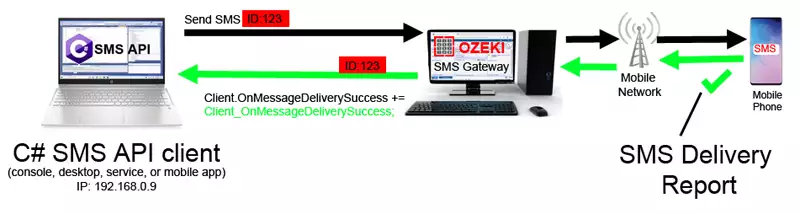
The C#/.Net SMS api sms delivery successfully event
The sms delivery reports in the C# SMS api arrive in the form of SMS delivery successful events. As soon as the delivery report reaches the SMS gateway, your C# app will receive an event with the SMS messages ID, and with the delivery date.
To handle the SMS delivery report in your C# SMS API follow these steps:
- Subscribe for the OnMessageDeliverySuccess event in your C# SMS API class
- Write the C# event handler to process the SMS delivery report
- Send an SMS, and record the sms message ID.
- Process the incoming SMS delivery report in your C# sms api code
C# sms api sms delivery report example:
Client.OnMessageDeliverySuccess += Client_OnMessageDeliverySuccess;

static void Client_OnMessageDeliverySuccess(object sender, OzxArgs< string, DateTime > e)
{
    Console.WriteLine("Message delivered. ID: " + e.Item1 + " Date: " + e.Item2);
}
If you read the above code example you will see, that a string and a date time is returned to the C#/.NET sms api. The string parameter is the messages id, and the date time is the date of successful delivery.
If you use an Android SMS Gateway, you receive this event, when the android phone receives the delivery report. If your SMS Server runs on a PC, this SMS delivery success event will be triggered if the SMS delivery report corresponding to the originally sent SMS message arrives either through the connected GSM SMS modem, or through an IP sms connection, such as an SMPP sms client connection.